Update
As pointed out by 0stracon there is an option in Hexrays that actually enables it to print all strings. Go to Hex-Rays Decompiler Analysis Options and untick ‘Print only constant string literals’.
To make it permanent, enable it in hexrays.cfg:
#define HO_CONST_STRINGS   0x0040   // Only print string literals if they reside
                                    // in read-only memory (e.g. .rodata segment).
                                    // When off, all strings are printed as literals.
                                    // You can override decompiler's decision by
                                    // adding 'const' or 'volatile' to the
                                    // string variable's type declaration
HEXOPTIONS               = 0x....   // Combination of HO_... bits
I was not aware of this option and reinvented the wheel 🙂
Old post
One of the features of IDA is its ability to recognize strings. This is a great feature, especially useful when you combine it with a power of HexRays decompiler – together they can produce a very nice pseudocode.
There is only one annoying bit there: if strings are recognized and defined inside a writable segment, they will not be presented by the decompiler as strings, but as variable names referring to strings.
Let’s have a look at the example.
In the below example (Dexter sample) IDA recognizes the string “UpdateMutex:”
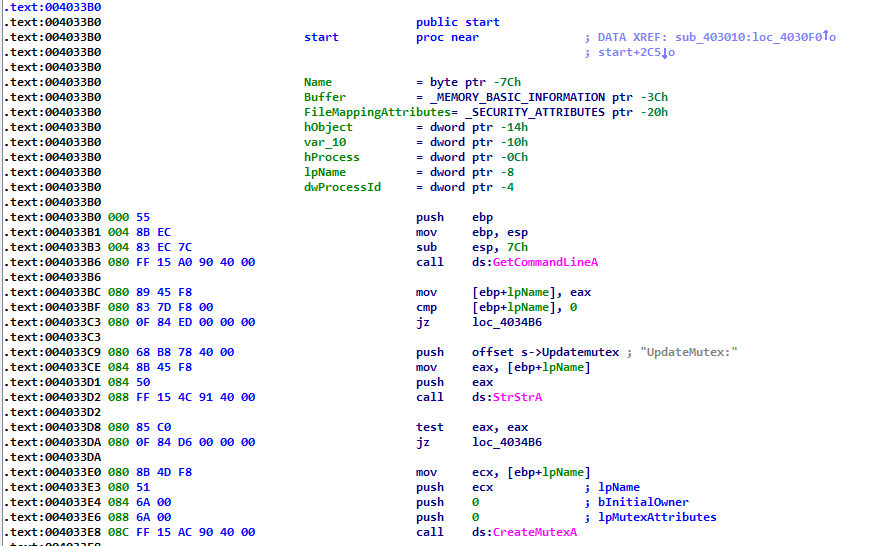 When we now switch to the decompiler view, we will see that the decompiler changes it to s__Updatemutex:
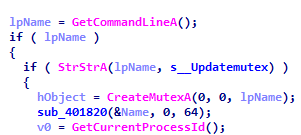
(the ‘s__’ prefix comes from the string prefix I typically use i.e. ‘s->’ which decompiler ‘flattens’ to ‘s__’). The s__Updatemutex refers to a string as shown below i.e. “UpdateMutex:” :
 Obviously, a decompiled code that refers to the actual string is much more readable – see the same piece of code as shown above where data is referred to by actual strings:
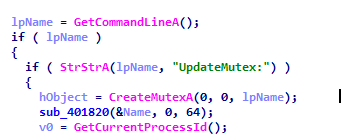 In order to make the decompiler use these actual strings (not the reference) we have two options:
- Make the segment where the string is recognized read-only (by disabling ‘Write’ in segment properties):
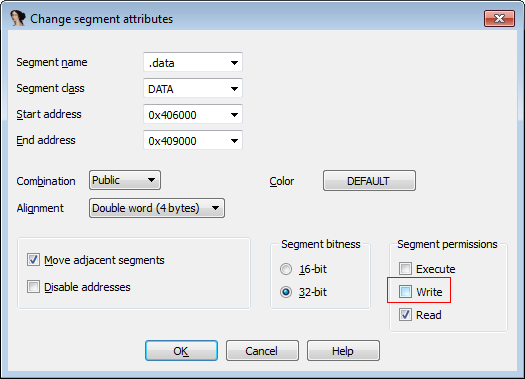 Unfortunately, this will confuse the decompiler and will make the output not trustworthy (it is often truncated). You will also receive a friendly reminder that you are doing something stupid 😉 a.k.a. a red card from the decompiler’s authors:
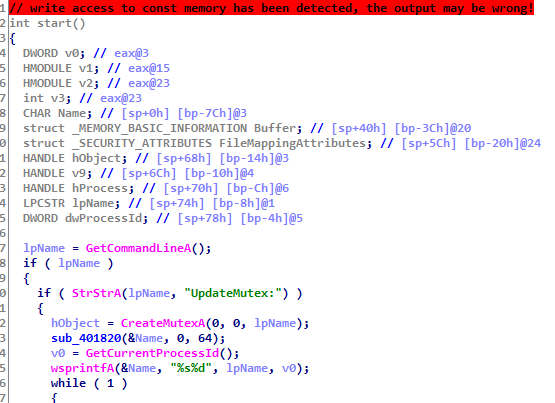
- The second option is to use a ‘proper’ method of fixing the issue by telling the IDA that the string is a read-only a.k.a. constant i.e. you can change the type of the string from existing one to the one prefixed with a keyword ‘const’:
 Since most of the time strings are static it is handy to convert all the strings in IDA to read-only i.e. retyping all of them using the ‘const’ trick.
This is exactly what the strings_to_const.py script is intended to do.
It enumerates all segments, finds all strings recognized by IDA (note the comment about the prefix I use, you may need to adapt it to your needs), and then converts them to read-only.
The result?
See below – before and after:
