Supporting dynamic Malware Analysis with WinHttp library debug logs (tracing)

Dynamic Malware Analysis is a tricky business. If you don’t use a dedicated sandbox, or an API monitor, it’s often hard to say what’s going on under the hood. Relying on differential analysis may not be enough and having multiple ways to get more information out of the session is always welcome. Process Monitor, DebugView, Performance/EWT logging, etc. are really handy as a support for black-box analysis, and so it is (or may be) enabling of the NtGlobalFlag. In this post I will describe one more hidden flag that can help to trace what’s going on when malware runs.

It turns out that WinHttp library has a built in debugging/tracing mechanism that enables it to log a lot of interesting details and send it either to a file, or directly to a debugger (or both). Lo and behold – it actually has a built-in API monitoring for us! It would be handy if this feature could become an integral part of popular debuggers (or a OllyDbg/Xdbg plug-in).

To enable the logging, you can either add the tracing options directly to Registry under the following key:

  • HKLM\SOFTWARE\Microsoft\Windows\
    CurrentVersion\Internet Settings\WinHttp\Tracing

f.ex. by using a reg file:

Windows Registry Editor Version 5.00

[HKEY_LOCAL_MACHINE\SOFTWARE\Microsoft\Windows\CurrentVersion\Internet Settings\WinHttp\Tracing]
"Enabled"=dword:00000001
"LogFilePrefix"="winhttp"
"ToFileOrDebugger"=dword:00000000
"ShowBytes"=dword:00000001
"ShowApiTrace"=dword:00000001
"MaxFileSize"=dword:01312d00

or use a winhttptracecfg tool which is a part of Windows Server 2003 Resource Kit Tools.

The tool is handy, and we can run it like this:

  • winhttptracecfg -l winhttp -e 1 -d 0 -s 1 -t 1 -m 20000000

Running the tool gives us the following output:
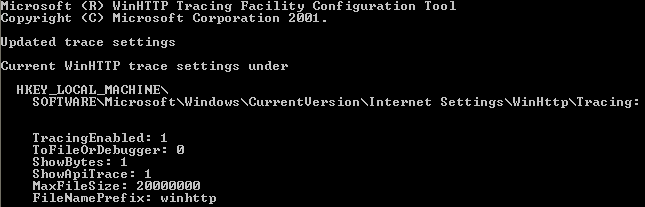
The meaning of the options is as follows:

  • -e : 1: enable tracing; 0: disable tracing
  • -l : [trace-file-prefix], i.e., “C:\Temp\Test3”; or simply: “Test3”
  • -d : 0: output to file; 1: output to debugger; 2: output to both
  • -s : 0: show HTTP headers only; 1: ANSI output; 2: Hex output  (note, this doesn’t seem to work on newer versions of Windows)
  • -t : 1: enable top-level API traces; 0: disable top-level API traces
  • -m : Maximum size the trace file can grow to

and in our case:

  • -e 1 –> TracingEnabled: 1  –> enable tracing
  • -d 0 –> ToFileOrDebugger: 0 –> save to file only
  • -s 1 –> ShowBytes: 1 –> show ANSI output (test on Windows XP)
  • -t 1 –> ShowApiTrace: 1  –> enables API monitoring
  • -m 20000000 –> MaxFileSize: 20000000 –> file should be large enough
  • -l winhttp –> FileNamePrefix: winhttp –> prefix used for a file name

Let’s run a test.

One tool that uses WinHttp library is Autoruns. When you launch it with the tracing enabled you should see a log file immediately or almost immediately created f.ex.:

  • winhttp-autoruns.exe-4020.22.11.42.035-12.15.2016.LOG

where ‘winhttp’ is a prefix we provided in the tracing options, followed by the process name ‘autoruns.exe’, then 4020 which is a PID of the process, then time and date.

The example content looks as below, note that:

  • API calls and their parameters are clearly visible
  • Return values are provided
  • Lots of internal state-related debug info is also provided

(If you don’t see the .log file, check the file / process with VirusTotal)

22:11:42.035 ::>>>> WinHttp Version 6.0 Build 6.1.7601 >>>>Process autoruns.exe [4020 (0xfb4)] started at 22:11:42.035 12/15/2016
22:11:42.035 ::WinHttpOpen("Microsoft-CryptoAPI/6.1", WINHTTP_ACCESS_TYPE_DEFAULT_PROXY (0), "", "", 0x0)
22:11:42.035 ::winhttp-dll added a reference to winhttp.dll (via LoadLibrary() call)
22:11:42.035 ::thread-pool created
22:11:42.035 ::thread pool initialized successfully
22:11:42.035 ::_SvcsStartup() succeeded; async-count = 1
22:11:42.035 ::WinHttpOpen() returning handle 0x38fcb98
22:11:42.035 ::WinHttpSetTimeouts(0x38fcb98, 0, 60000, 60000, 60000)
...
22:15:26.005 ::WinHttpOpen() returning handle 0x39ef730
22:15:26.005 ::WinHttpConnect(0x39ef730, "www.virustotal.com", 443, 0x0)
22:15:26.005 ::Indicate Status 0x39efad0, 0x0, WINHTTP_CALLBACK_STATUS_HANDLE_CREATED (1024), 0x12edd4 [0x39efad0], 4
22:15:26.005 ::WinHttpConnect() returning handle 0x39efad0
22:15:27.066 ::WinHttpOpenRequest(0x39efad0, "POST", "/partners/sysinternals/file-reports?apikey=4e3202fdbe953d628f650229af5b3eb49cd46", "", "", 0x0, 0x00800000)
22:15:27.066 ::Indicate Status 0x395ebe8, 0x0, WINHTTP_CALLBACK_STATUS_HANDLE_CREATED (1024), 0x2cefc84 [0x395ebe8], 4
22:15:27.066 ::WinHttpCreateUrl(0x2cefc20, 0x0, 0x0, 0x2cefc70)
22:15:27.066 ::    WinHttpCreateUrl(); URL = (null), URL Length = 0
22:15:27.066 ::    WinHttpCreateUrl: error 122 [ERROR_INSUFFICIENT_BUFFER]
22:15:27.066 ::WinHttpCreateUrl() returning FALSE
22:15:27.066 ::WinHttpCreateUrl(0x2cefc20, 0x0, 0x2af5b8, 0x2cefc70)
22:15:27.066 ::    WinHttpCreateUrl(); URL = https://www.virustotal.com/partners/sysinternals/file-reports?apikey=4e3202fdbe9, URL Length = 133
22:15:27.066 ::WinHttpCreateUrl() returning TRUE
22:15:27.066 ::WinHttpOpenRequest() returning handle 0x395ebe8
22:15:27.066 ::WinHttpGetProxyForUrl(0x39ef730, "https://www.virustotal.com", 0x2cefd9c, 0x2cefdb4)

On XP, the ShowBytes enables inclusions of the additional data dumps for headers f.ex.:

11:51:55.106 ::*0000001* :: sending data:
11:51:55.106 ::*0000001* :: 177 (0xb1) bytes
11:51:55.106 ::*0000001* :: <<<<-------- HTTP stream follows below ----------------------------------------------->>>>
11:51:55.106 ::*0000001* :: GET /wpad.dat HTTP/1.1
11:51:55.106 ::*0000001* :: Accept: */*
11:51:55.106 ::*0000001* :: User-Agent: Mozilla/4.0 (compatible; MSIE 9.0; Windows NT 6.1; Trident/5.0; .NET5.0C; .NET5.0E)
11:51:55.106 ::*0000001* :: Host: 127.0.0.1
11:51:55.106 ::*0000001* :: Connection: Keep-Alive
11:51:55.122 ::*0000001* :: 
11:51:55.122 ::*0000001* :: 
11:51:55.122 ::*0000001* :: <<<<-------- End ----------------------------------------------->>>>
11:51:55.122 ::*0000001* :: WinHttpSendRequest() returning TRUE
11:51:55.122 ::*0000001* :: WinHttpReceiveResponse(0xaf2000, 0x0)
11:51:55.122 ::*0000001* :: received data:
11:51:55.122 ::*0000001* :: 67 (0x43) bytes
11:51:55.122 ::*0000001* :: <<<<-------- HTTP stream follows below ----------------------------------------------->>>>
11:51:55.122 ::*0000001* :: HTTP/1.1 200 OK
11:51:55.122 ::*0000001* :: Content-Length: 59745
11:51:55.122 ::*0000001* :: Content-Type: text/html
11:51:55.122 ::*0000001* :: 
11:51:55.122 ::*0000001* :: 
11:51:55.122 ::*0000001* :: <<<<-------- End ----------------------------------------------->>>>

PE Section names – re-visited

Update 2022-11-23

Added .profile for NightHawk

Update 2021-01-29

Added a few more sections

Update 2020-10-15

Added .AAWEBS

Update 2020-08-15

Added .imrsiv, also visit this post.

Update 2019-03-15

Added sections from demoscene files; additional protectors, and many others; big update in general

Update 2019-02-12

Added .ecode and .edata for EPL

Update 2018-12-09

Added .mnbvcx1 & .mnbvcx2, .import, some ELF sections

Update 2018-06-02

Added .apiset

Update 2017-11-21

Updated info on minATL and .wpp_sf

thx to @digirati82 for bringing it to my attention

Update: This list has been last updated on 7th of January 2017

4 years back I published a list of PE section names; I recently thought of revisiting the list and as a result added a lot more entries.

This is the latest version of the list (note that there are duplicates, if treated as case-insensitive):

The packer/protector/tools section names/keywords

  • .aspack – Aspack packer
  • .adata – Aspack packer/Armadillo packer
  • ASPack – Aspack packer
  • .ASPack – ASPAck Protector
  • .boom – The Boomerang List Builder (config+exe xored with a single byte key 0x77)
  • .ccg – CCG Packer (Chinese Packer)
  • .charmve – Added by the PIN tool
  • BitArts – Crunch 2.0 Packer
  • DAStub – DAStub Dragon Armor protector
  • !EPack – Epack packer
  • .ecode – Built with EPL
  • .edata – Built with EPL
  • .enigma1 – Enigma Protector
  • .enigma2 – Enigma Protector
  • FSG! – FSG packer (not a section name, but a good identifier)
  • .imrsiv – special section used for applications that can be loaded to OS desktop bands.
  • .gentee – Gentee installer
  • kkrunchy – kkrunchy Packer
  • lz32.dll – Crinkler
  • .mackt – ImpRec-created section
  • .MaskPE – MaskPE Packer
  • MEW – MEW packer
  • .mnbvcx1 – most likely associated with Firseria PUP downloaders
  • .mnbvcx2 – most likely associated with Firseria PUP downloaders
  • .MPRESS1 – Mpress Packer
  • .MPRESS2 – Mpress Packer
  • .neolite – Neolite Packer
  • .neolit – Neolite Packer
  • .nsp1 – NsPack packer
  • .nsp0 – NsPack packer
  • .nsp2 – NsPack packer
  • nsp1 – NsPack packer
  • nsp0 – NsPack packer
  • nsp2 – NsPack packer
  • .packed – RLPack Packer (first section)
  • PEPACK!! – Pepack
  • pebundle – PEBundle Packer
  • PEBundle – PEBundle Packer
  • PEC2TO – PECompact packer
  • PECompact2 – PECompact packer (not a section name, but a good identifier)
  • PEC2 – PECompact packer
  • pec – PECompact packer
  • pec1 – PECompact packer
  • pec2 – PECompact packer
  • pec3 – PECompact packer
  • pec4 – PECompact packer
  • pec5 – PECompact packer
  • pec6 – PECompact packer
  • PEC2MO – PECompact packer
  • PELOCKnt – PELock Protector
  • .perplex – Perplex PE-Protector
  • PESHiELD – PEShield Packer
  • .petite – Petite Packer
  • .pinclie – Added by the PIN tool
  • ProCrypt – ProCrypt Packer
  • .profile – NightHawk C2 framework (by MDSec)
  • .RLPack – RLPack Packer (second section)
  • .rmnet – Ramnit virus marker
  • RCryptor – RPCrypt Packer
  • .RPCrypt – RPCrypt Packer
  • .seau – SeauSFX Packer
  • .sforce3 – StarForce Protection
  • .shrink1 – Shrinker
  • .shrink2 – Shrinker
  • .shrink3 – Shrinker
  • .spack – Simple Pack (by bagie)
  • .svkp – SVKP packer
  • Themida – Themida Packer
  • .Themida – Themida Packer
  • .taz – Some version os PESpin
  • .tsuarch – TSULoader
  • .tsustub – TSULoader
  • .packed – Unknown Packer
  • PEPACK!! – Pepack
  • .Upack – Upack packer
  • .ByDwing – Upack Packer
  • UPX0 – UPX packer
  • UPX1 – UPX packer
  • UPX2 – UPX packer
  • UPX3 – UPX packer
  • UPX! – UPX packer
  • .UPX0 – UPX Packer
  • .UPX1 – UPX Packer
  • .UPX2 – UPX Packer
  • .vmp0 – VMProtect packer
  • .vmp1 – VMProtect packer
  • .vmp2 – VMProtect packer
  • VProtect – Vprotect Packer
  • .winapi – Added by API Override tool
  • WinLicen – WinLicense (Themida) Protector
  • _winzip_ – WinZip Self-Extractor
  • .WWPACK – WWPACK Packer
  • .WWP32 – WWPACK Packer (WWPack32)
  • .yP – Y0da Protector
  • .y0da – Y0da Protector

Unclassified from Demoscene repo

These are PE sections extracted from the demoscene corpora; some of them use a name that is clearly associated with a respective demo group; some are variations of well-known pe sections and we can guess their meaning, some are clearly one-offs; I have provided the section name, some quick comment, if applicable, and a relative path on the scene.org where you can find sample of a PE file using a described section. I provided only one path, but in some cases there are many, so you may need to do a homework if you want more samples. If you see folders prefixed with an underscore it means that the file name that follows refers to a file inside an archive (and the actual archive is named like the folder name, but w/o the underscore prefix).

  • .crtemui – demos\groups\raizor\mengers_mice
  • .delete – demos\groups\scoopex\_scx-snc2.zip\ScxNchips02.exe
  • .exc – demos\groups\artwork\mdiv2\_mdiv2b2.zip\mdiv2be.exe
  • .g4kcod2, .g4kcod3, .g4kcod4, .g4kcoda, .g4kcodb, .g4kcodc, .g4kcodd, .g4kcodf, .g4kcodg, .g4kcodh, .g4kcodi, .g4kcodj, .g4kcodk, .g4kcodl, .g4kcodp, .g4kcods, .g4kcodt, .g4kcodw, .g4kcodx, .g4kcody, .g4kcodz, .g4kdat1, .g4kdat2, .g4kmuc1, .g4kmuc2, .g4kmuc3, .g4kmuc4, .g4kmuc5 – demos\groups\raizor\mengers_mice\_mengersmice.zip\mengersMice.exe
  • .icon – possibly an icon resource – demos\groups\class\cls_d2k.zip
  • .intro – graphics\groups\superior_art_creations\_sac-27.zip\com-myth.exe
  • .load – demos\groups\class\_c64.zip\c64.exe
  • .mydata – demos\groups\p4!nt\_p4!nt_micro_intro.zip\demoscene.exe
  • .pe – possibly PE file – demos\groups\coolphat\_cphbv1.zip\cphbv1.exe
  • .pklstb – demos\groups\scoopex\_scx-snc2.zip\ScxNchips02.exe
  • .Razor – Razor group – graphics\groups\superior_art_creations\_sac-18.zip\HT-PDM6.EXE
  • .relo2 – demos\groups\scoopex\_scx-snc2.zip\ScxNchips02.exe
  • .rsrc A – possibly variant of resource section – demos\compilations\falcon_demo_mania\cd1\codec_and_player\_bsplayer084.rc4.455d.zip\bplay.exe
  • .sCe!05 – Scienide group – demos\groups\scienide\_scienide+reloaded+titan-reloaded_cracktro_3.zip\cracktro.exe
  • .trace – demos\groups\ivory_labs\_iv_mdt9kf.zip\demo.exe
  • .wavefmt – demos\groups\raizor\mengers_mice\_mengersmice.zip\mengersMice.exe
  • .wavehdr – demos\groups\raizor\mengers_mice\_mengersmice.zip\mengersMice.exe
  • .xm – possibly an XM module – music\groups\bmp\houseworks\_bmphw006.zip\spm-042.exe
  • _RDATA – possibly Read-only data – demos\groups\$\_$-chem.zip\chem.exe
  • Address – demos\groups\genesis\_genesis-shrek_2.zip\intro.exe
  • AUTO – demos\groups\3state\_3s-mspace.zip\melrose.exe
  • CLS – demos\groups\class\_class-sp4.zip\intro.exe
  • CODE32 – 32-bit code section – graphics\ascii\zeit\_zeit_03.zip\ALL2BIT.DLL
  • CONST32 – graphics\ascii\zeit\_zeit_03.zip\ALL2BIT.DLL
  • CPHb – Coolphat group – demos\groups\coolphat\_cph!mic2.zip\cph_mi2.exe
  • CRO0 – Cro group – graphics\groups\cro\_cro-20_mag.zip\Install.exe
  • CR01 – Cro group – graphics\groups\cro\_cro-20_mag.zip\Install.exe
  • fuzzion – Fuzzion group – demos\groups\fuzzion\_fzn_blursux.zip\blursux_unpacked.exe
  • fzn03 – Fuzzion group – demos\groups\fuzzion\_fzn_afull.zip\fzn_afull.exe
  • Guy ! – music\disks\_modaddiction2.zip\modaddiction2.exe
  • imports – possibly import section – mags\tapmag\_tapmag4.zip\TAPMAG4A.EXE
  • MYTH – graphics\groups\superior_art_creations\_sac-28.zip\kmx-dev03.exe
  • Not War! – demos\compos\tmdc8\07.null_ok-buchstabensuppe\_buchstabensuppe.zip\buchstabensuppe.exe
  • packer. – Farbrausch group- demos\groups\3state\_3s-sonnet.zip\sonnet.exe
  • PS – demos\groups\aardbei\_aardbei_southside.zip\aardbei_southside.exe
  • relocs – possibly relocations – mags\tapmag\_tapmag4.zip\TAPMAG4A.EXE
  • resource – mags\tapmag\_tapmag4.zip\TAPMAG4A.EXE
  • resultat – demos\groups\bypass\_love.zip\love.exe
  • Scooopex – Scoopex group – demos\groups\scoopex\_blue_knot_scoopex_and_i8u.zip\BlueKnot.exe
  • Scoopex – Scoopex group – demos\groups\scoopex\_blue_knot_scoopex_and_i8u.zip\BlueKnot.exe
  • Signatur – demos\groups\tlotb\_tlotb_weare.zip\WEARE.EXE
  • STACK – demos\groups\superstition\_superstition-melora-w32.zip\melora.exe

List of popular section names

  • .00cfg – Control Flow Guard (CFG) section (added by newer versions of Visual Studio)
  • .AAWEBS – section used by Amiti Antivirus DLLs webspam.dll and webspamwow64.dll
  • .apiset – a section present inside the apisetschema.dll
  • .arch – Alpha-architecture section
  • .autoload_text – cygwin/gcc; the Cygwin DLL uses a section to avoid copying certain data on fork.
  • .bindat – Binary data (also used by one of the downware installers based on LUA)
  • .bootdat – section that can be found inside Visual Studio files; contains palette entries
  • .bss – Uninitialized Data Section
  • .BSS – Uninitialized Data Section
  • .buildid – gcc/cygwin; Contains debug information (if overlaps with debug directory)
  • .CLR_UEF – .CLR Unhandled Exception Handler section; see https://github.com/dotnet/coreclr/blob/master/src/vm/excep.h
  • .code – Code Section
  • .cormeta – .CLR Metadata Section
  • .complua – Binary data, most likely compiled LUA (also used by one of the downware installers based on LUA)
  • .CRT – Initialized Data Section  (C RunTime)
  • .cygwin_dll_common – cygwin section containing flags representing Cygwin’s capabilities; refer to cygwin.sc and wincap.cc inside Cygwin run-time
  • .data – Data Section
  • .DATA – Data Section
  • .data1 – Data Section
  • .data2 – Data Section
  • .data3 – Data Section
  • .debug – Debug info Section
  • .debug$F – Debug info Section (Visual C++ version <7.0)
  • .debug$P – Debug info Section (Visual C++ debug information – precompiled information
  • .debug$S – Debug info Section (Visual C++ debug information – symbolic information)
  • .debug$T – Debug info Section (Visual C++ debug information – type information)
  • .drectve  – directive section (temporary, linker removes it after processing it; should not appear in a final PE image)
  • .didat – Delay Import Section
  • .didata – Delay Import Section
  • .edata – Export Data Section
  • .eh_fram – gcc/cygwin; Exception Handler Frame section
  • .export – Alternative Export Data Section
  • .fasm – FASM flat Section
  • .flat – FASM flat Section
  • .gfids – section added by new Visual Studio (14.0); purpose unknown
  • .giats – section added by new Visual Studio (14.0); purpose unknown
  • .gljmp – section added by new Visual Studio (14.0); purpose unknown
  • .glue_7t – ARMv7 core glue functions (thumb mode)
  • .glue_7 – ARMv7 core glue functions (32-bit ARM mode)
  • .idata – Initialized Data Section  (Borland)
  • .idlsym – IDL Attributes (registered SEH)
  • .impdata – Alternative Import data section
  • .import – Alternative Import data section
  • .itext – Code Section  (Borland)
  • .ndata – Nullsoft Installer section
  • .orpc – Code section inside rpcrt4.dll
  • .pdata – Exception Handling Functions Section (PDATA records)
  • .rdata – Read-only initialized Data Section  (MS and Borland)
  • .reloc – Relocations Section
  • .rodata – Read-only Data Section
  • .rsrc – Resource section
  • .sbss – GP-relative Uninitialized Data Section
  • .script – Section containing script
  • .shared – Shared section
  • .sdata – GP-relative Initialized Data Section
  • .srdata – GP-relative Read-only Data Section
  • .stab – Created by Haskell compiler (GHC)
  • .stabstr – Created by Haskell compiler (GHC)
  • .sxdata – Registered Exception Handlers Section
  • .text – Code Section
  • .text0 – Alternative Code Section
  • .text1 – Alternative Code Section
  • .text2 – Alternative Code Section
  • .text3 – Alternative Code Section
  • .textbss – Section used by incremental linking
  • .tls – Thread Local Storage Section
  • .tls$ – Thread Local Storage Section
  • .udata – Uninitialized Data Section
  • .vsdata – GP-relative Initialized Data
  • .xdata – Exception Information Section
  • .wixburn – Wix section; see https://github.com/wixtoolset/wix3/blob/develop/src/burn/stub/StubSection.cpp
  • .wpp_sf  – section that is most likely related to WPP (Windows software trace PreProcessor); not sure how it is used though; the code inside the section is just a bunch of routines that call FastWppTraceMessage that in turn calls EtwTraceMessage
  • BSS – Uninitialized Data Section  (Borland)
  • CODE – Code Section (Borland)
  • DATA – Data Section (Borland)
  • DGROUP – Legacy data group section
  • edata – Export Data Section
  • idata – Initialized Data Section  (C RunTime)
  • INIT – INIT section (drivers)
  • minATL – Section that can be found inside some ARM PE files; purpose unknown; .exe files on Windows 10 also include this section as well; its purpose is unknown, but it contains references to ___pobjectentryfirst,___pobjectentrymid,___pobjectentrylast pointers used by Microsoft::WRL::Details::ModuleBase::… methods described e.g. here, and also referenced by .pdb symbols; so, looks like it is being used internally by Windows Runtime C++ Template Library (WRL) which is a successor of Active Template Library (ATL); further research needed
  • PAGE – PAGE section (drivers)
  • rdata – Read-only Data Section
  • sdata – Initialized Data Section
  • shared – Shared section
  • Shared – Shared section
  • testdata – section containing test data (can be found inside Visual Studio files)
  • text – Alternative Code Section

Other section names

  • .text$<name> – Typically a temporary Code Section merged during building; <name> can be anything; the sections are sorted by name, and combined into a single .text section during the linking process
  • .data$<name> – as above, for .data section
  • .rdata$<name> – as above, for .rdata section
  • .rsrc$<name> – as above, for .rsrc section
  • /<number> – often found in Windows clones of *nix tools compiled with mingw/cygwin; these typically replace lengthy section names that are used under *nix; the compiler often preserves the section names in the debugging information (which is often attached to the file); most of PE dumpers can’t process the debug information and just shows the raw numeric section names; tools like IDA can process this information and shows us the real section names (f.ex. .autoload_text, .cygwin_dll_common);  examples below:
    • /4
    • /14
    • /19
    • /29
    • /41
    • /48
    • /55
    • /67
    • /78
    • /89
  • Related to the above, the sections used by mingw/cygwin are listed below (they can be found inside the cygwin.sc file in the source tarball).
    • .init
    • .text
    • .text$* (basically, .text$<name>)
    • .glue_7t
    • .glue_7
    • .fini
    • .gcc_exc
    • .gcc_except_table
    • .autoload_text
    • .data
    • .data2
    • .data$* (basically, .data$<name>)
    • .data_cygwin_nocopy
    • .rdata
    • .rdata$* (basically, .rdata$<name>)
    • .eh_frame
    • .pdata
    • .bss
    • COMMON
    • .edata
    • .debug$S
    • .debug$T
    • .debug$F
    • .drectve
    • .idata
    • .idata$2
    • .idata$3
    • .idata$4
    • .idata$5
    • .idata$6
    • .idata$7
    • .CRT
    • .endjunk
    • .cygwin_dll_common
    • .rsrc
    • .rsrc$* (basically, .rsrc$<name>)
    • .reloc
    • .stab
    • .stabstr
    • .debug_aranges
    • .debug_pubnames
    • .debug_info
    • .debug_abbrev
    • .debug_line
    • .debug_frame
    • .debug_str
    • .debug_loc
    • .debug_macinfo
    • .debug_ranges
    • .cygheap
  • Not PE sections, but LINUX ELF file format sections
    • you may come across some of these inside PE; may be related to some code ported from *NIX; hard to say as I have not seen enough samples to confirm 100%
    • .btext – Big Endian .text section (code)
    • .bdata – Big Endian .data section (data)
    • .brdata – Big Endian .rdata section (Read-Only data)
    • .bctors – Big Endian .ctors section (constructors)
    • .bdtors – Big Endian .dtors section (destructors)
    • .rela.btext – Big Endian relocation section for .text
    • .rela.bdata – Big Endian relocation section for .data
    • .rela.brdata – Big Endian relocation section for .rdata
    • .rela.bctors – Big Endian relocation section for .ctors
    • .rela.bdtors – Big Endian relocation section for .dtors
    • .bbss – Big Endian section .bss (uninitialized data)
    • .ctors – Little Endian .ctors section (constructors)
    • .dtors – Little Endian .dtors section (destructors)
    • .ltext – Little Endian .text section (code)
    • .ldata – Little Endian .data section (data)
    • .lrdata – Little Endian .rdata section (Read-Only data)
    • .lctors – Little Endian .ctors section (constructors)
    • .ldtors – Little Endian .dtors section (destructors)
    • .rela.ltext – Little Endian relocation section for .text
    • .rela.ldata – Little Endian relocation section for .data
    • .rela.lrdata – Little Endian relocation section for .rdata
    • .rela.lctors – Little Endian relocation section for .ctors
    • .rela.ldtors – Little Endian relocation section for .dtors
    • .lbss – Little Endian section .bss (uninitialized data)
  • Primarily Linux-oriented, but sometimes present in PE e.g. in some old Watcom-compiled binaries
    • begtext – beginning of the text section
    • begdata – beginning of the data section
    • begbss – beginning of the bss section
    • endtext – end of the text section
    • enddata – end of the data section
    • endbss – end of the bss section