Beyond good ol’ Run key, Part 70

Back in early 2000s shell extensions and desktop enhancers were very popular. Some of these ideas survived till today and even now one can either use pre-installed ones, or install new deskbands on the system.

There are many coders who already did a great job explaining what desk bands are and how to implement them, so instead of pretending that I know what I am talking about, I will just suggest that you read this great article ‘Shell Extensibility – Explorer Desk Band, Tray Notification Icon et al.‘ by Alex Blekhman. When you run the Calendar.exe that is attached to the article you will then have an option to make the calendar present as a Deskband
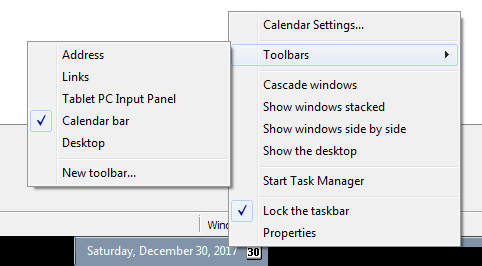
Interestingly enough, as far as I can tell Autoruns still doesn’t detect them.

To find out where the information about deskbands and other Explorer extension bars is stored in Registry you can read this article.

If you are in a hurry, just need to enumerate Registry and look for all CLSIDs with the Implemented Categories\ key with the following deskband identifiers set:

DeskBand
{00021492-0000-0000-C000-000000000046}

VerticalBand 
{00021493-0000-0000-C000-000000000046}

HorizontalBand 
{00021494-0000-0000-C000-000000000046}

e.g.:

HKLM\SOFTWARE\Classes\CLSID\...\
Implemented Categories\{00021492-0000-0000-C000-000000000046}

Additionally, it may be worth checking the following key:

HKCU\Software\Microsoft\Windows\CurrentVersion\Explorer\
Discardable\PostSetup\Component Categories\...\Enum

This is where Explorer stores cached information about explorer bar objects.
Using localization as a (lame) anti-sandbox/anti-debug trick

Most of the sandboxes that I know of use English as a base language. It is not surprising – after all anglophones are probably one of the most targeted user bases out there anyway. However… there is still a huge population of users using their non-English native languages. For these, the localization industry works hard to deliver the user interface experience in their native language. Windows alone is localized to a large number languages and supports both number of languages/locales and a multilingual user interface (MUI).

Localization of software is non-trivial and Windows helps with it in many ways. One of the most popular tricks in localization engineers’/developers’ hands is moving the textual part of the UI to so-called string resources. You may find them in most of the programs by inspecting them with a resource hacker tool.

What’s interesting is that by combining this feature with the under-the-hood localization that is done by OS depending on the currently used UI language you may get two (or more) different results while running the same code which does not (at least on the surface) contain any conditional code.

Let’s have a look at the example.

The code below loads a string from the resources, and shows a message box.

 invoke GetModuleHandle,NULL
 invoke LoadStringW,eax,1500,Offset Buffer,512
 invoke MessageBoxW,NULL,Offset Buffer,Offset Buffer,MB_OK

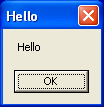
Nothing really unusual. If you run this code on the English Windows, you will see a message box showing ‘Hello’:

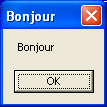
If you run the very same code on the French Windows, you will get the message ‘Bonjour’:

When LoadStringW API is called, Windows recognizes the language of the OS and retrieves one of the strings stored inside the executable:

STRINGTABLE
LANGUAGE LANG_ENGLISH, SUBLANG_ENGLISH_US
{
1500, "Hello"
}
STRINGTABLE
LANGUAGE LANG_FRENCH, SUBLANG_FRENCH
{
1500, "Bonjour"
}

Now, if instead of showing the message the retrieved string was treated as an URL that could be used to download file with URLDownloadToFileW and then that file was executed with WinExec we could easily get two different execution flows, dependent on the OS (and URLs configured separately for two (or more) languages).

It would take hawk eyes of the reverser to spot this, because unless s/he looked at the resources, the debug session, and any English-focused sandbox would not recognize this subtle (and hidden) code flow change. While it’s easy to spot it in a small program, dealing with any larger, or more advanced program, or perhaps one where the trick is used in a more clandestine way would go most likely unnoticed.

You can download the Hello/Bonjour example from here. I didn’t bother to create URLDownloadToFileW/WinExec one, because it’s a pretty lame thing anyway…