Clustering and Advanced/In-depth Malware Analysis with HexDive Pro

A few months ago I introduced a new tool called HexDive. The tool speeds up analysis of strings that are extracted from portable executable files (PE). It does it by showing only these strings that are the most relevant from a malware analysis perspective.

Strings extracted directly from a PE file have certainly some value, but it’s limited by many factors including:

  • Compression (code and/or data is decompressed only when program is executed)
  • Encryption (code and/or data is decrypted only when program is executed)
  • Obfuscation (code and/or data are hidden between a lot of junk code and data)
  • Wrapping (code and/or data is hidden deep inside the file and ‘unwrapped’ only when program is executed)
  • Dynamic code loading (code injects, shellcodes that may be hidden using techniques described above)
  • The environment (code and/or data is not a part of the malware itself, but is extracted from the system on which it is executed)
  • The nature of run-time (code and data seen depends on the environment and code branches inside the malware)
  • Anti- tricks (what we see depends heavily on malware’s ability to detect it is running inside the sandbox, or under monitoring tools e.g. debugger)

To address this, HexDive Pro takes analysis to the next level and allows to extract many run-time artifacts produced by a running program.

This includes:

  • API calls and their parameters
  • Hex dumps and Strings extracted from buffers allocated during the run-time (including stack)
  • Code Injects and shellcodes
  • Wrapped code
  • Screenshots of all windows
  • Very specific features of the malware that can help to uniquely identify it
  • and it can do a few other things that I will keep secret at the moment, but will reveal in next posts 🙂

To demonstrate what HexDive Pro can do, all I have to do is to provide a reference to what I posted in last few months.

In fact, most of the clustering, batch analysis and malware analysis posts were heavily influenced by results provided by HexDive Pro. The results the tool provided thus far helped me to:

  • … discover the hidden code inside ZeroAccess
  • … cluster ZeroAccess samples I have in my collection to find out which contain code using Extended Attributes (NTFS) and to create a list of all known EA names used by this malware
  • … cluster APT sampleset in many ways.
  • … instantly discover strings in Flame malware
  • and others, more or less influenced by it (including various statistics)

The results of these experiments helped me a lot to tweak the code so that it is as useful as possible.

On the surface, HexDive Pro is working like a typical API monitor – running malware under its control and using various tricks to intercept traces of its execution. Going deeper, it combines best pieces of Application Monitor, Hex Dive, HMFT, Hstrings and also leverages information from numerous databases of artifacts (both static and dynamic) I gathered over the years of malware analysis.

All of these combined efforts produce a tool that makes it possible to gain an in-depth knowledge about the analyzed malware within 30-180 seconds.

In fact, the APT1 clustering data I posted here has been generated pretty quickly using HexDive Pro. The results posted were just a tip of the iceberg as the output contained all the juice one can extract manually only after hours of painstaking analysis. If you multiply it by a number of samples, the performance gain is tremendous.

Anyone who does malware analysis professionally knows how tedious in-depth analysis can be. Anyone who doesn’t, is forced to rely on writeups written by the antivirus companies, peers’ help and search engines.

With HexDive Pro you will be able to often learn more about malware than you can read online, you will be also able to verify what you read in AV writeups. On occasion, the tool will also miserably fail which could mean that you have stumbled upon a new trick  to inject code, new trick to escape tracing, or new 0day that helps the malware to run free. Or there may be a bug.

Such is a life of software like this 🙂

Last, but not least – the audience for the tool are:

  • Forensic investigators who don’t have malware analysis skills.
  • Beginners and intermediate level malware analysts.
  • Anyone who wants to do batch analysis and clustering of their samplesets.
  • Anyone who wants to analyze not only malware, but any Windows software (32-bit only); the tool provides in-depth look into internals working of the software applications and may be useful in security/vulnerability assessments.
  • Hardcore malware analysts may benefit from the tool as well, but they probably already have adequate or better private tools on their own.

I have tested it extensively and since it’s a private tool that evolved from a few API monitors I wrote in the past, as well as many other tools/scripts I have written and finally my own experience doing in-depth malware analysis I have a hope it will be useful for the community.

The first version is coming soon. Stay tuned!

Note: The software will be available commercially only.

Some more examples

The following artifacts are extracted instantly:

  • List of API extracted during run-time:
    • Gets Procedure Address: WS2_32.dll, accept
    • Gets Procedure Address: WS2_32.dll, bind
    • Gets Procedure Address: WS2_32.dll, closesocket
    • Gets Procedure Address: WS2_32.dll, connect
    • Gets Procedure Address: WS2_32.dll, getpeername
    • Gets Procedure Address: WS2_32.dll, getsockname
    • Gets Procedure Address: WS2_32.dll, getsockopt
  • User agents used by malware
  • Information about stealing capabilities of malware (e.g. targeted applications)
  • Files that malware tries to find on the system (e.g. to actually run)
  • Various tricks to escape analysis/HIPS
  • Various tricks to detect monitoring tools
  • Access to PhysicalDevices (memory, drives) – usually bypassing HIPS and infecting MBR
  • Buffers (read/written files, read/written memory, etc.)
Injected/wrapped .exe
4D 5A 90 00 03 00 00 00 04 00 00 00 FF FF 00 00 - MZ.............. 
00 00 00 00 00 00 00 00 00 00 00 00 00 00 00 00 - ................ 
0E 1F BA 0E 00 B4 09 CD 21 B8 01 4C CD 21 54 68 - ........!..L.!Th 
74 20 62 65 20 72 75 6E 20 69 6E 20 44 4F 53 20 - t be run in DOS  
D7 52 82 ED 93 33 EC BE 93 33 EC BE 93 33 EC BE - .R...3...3...3.. 
10 3B B0 BE 92 33 EC BE 1D 3B B3 BE 97 33 EC BE - .;...3...;...3.. 
52 69 63 68 93 33 EC BE 00 00 00 00 00 00 00 00 - Rich.3..........
50 45 00 00 4C 01 06 00 01 A6 4A 46 00 00 00 00 - PE..L.....JF....
B8 00 00 00 00 00 00 00 40 00 00 00 00 00 00 00 - ........@.......
00 00 00 00 00 00 00 00 00 00 00 00 E0 00 00 00 - ................
69 73 20 70 72 6F 67 72 61 6D 20 63 61 6E 6E 6F - is program canno
6D 6F 64 65 2E 0D 0D 0A 24 00 00 00 00 00 00 00 - mode....$.......
10 3B B1 BE 94 33 EC BE 93 33 ED BE 8A 33 EC BE - .;...3...3...3..
10 3B B2 BE 92 33 EC BE 10 3B B6 BE 92 33 EC BE - .;...3...;...3..
00 00 00 00 00 00 00 00 00 00 00 00 00 00 00 00 - ................
00 00 00 00 E0 00 02 21 0B 01 05 0C 00 90 00 00 - .......!........
                                               
MBR code
33 C0 8E D0 BC 00 7C FB 50 07 50 1F FC BE 1B 7C - 3.....|.P.P....|
38 6E 00 7C 09 75 13 83 C5 10 E2 F4 CD 18 8B F5 - 8n.|.u..........
F0 AC 3C 00 74 FC BB 07 00 B4 0E CD 10 EB F2 88 - ..<.t...........
80 7E 04 0C 74 05 A0 B6 07 75 D2 80 46 02 06 83 - .~..t....u..F...
BC 81 3E FE 7D 55 AA 74 0B 80 7E 10 00 74 C8 A0 - ..>.}U.t..~..t..
00 B4 08 CD 13 72 23 8A C1 24 3F 98 8A DE 8A FC - .....r#..$?.....
0A 77 23 72 05 39 46 08 73 1C B8 01 02 BB 00 7C - .w#r.9F.s......|
BF 1B 06 50 57 B9 E5 01 F3 A4 CB BD BE 07 B1 04 - ...PW...........
83 C6 10 49 74 19 38 2C 74 F6 A0 B5 07 B4 07 8B - ...It.8,t.......
4E 10 E8 46 00 73 2A FE 46 10 80 7E 04 0B 74 0B - N..F.s*.F..~..t.
46 08 06 83 56 0A 00 E8 21 00 73 05 A0 B6 07 EB - F...V...!.s.....
B7 07 EB A9 8B FC 1E 57 8B F5 CB BF 05 00 8A 56 - .......W.......V
43 F7 E3 8B D1 86 D6 B1 06 D2 EE 42 F7 E2 39 56 - C..........B..9V
8B 4E 02 8B 56 00 CD 13 73 51 4F 74 4E 32 E4 8A - .N..V...sQOtN2..

JumpLists file names and AppID calculator

JumpList files are an interesting forensic artifact and as such they have been thoroughly explored by many researchers over last 2-3 years. There is really a lot of material out there and there are also many tools that parse JumpList files’ structure quite well. This is why in this post I will focus not on the content of JumpList files, but on their… file names.

Algorithm

The JumpList file names are created using hash-like values that in turn are based on something that is called AppID. The Forensics Wiki lists many known Jump List file names based on AppIDs; examples include:

  • 918e0ecb43d17e23 used by Notepad (32-bit)
  • 9b9cdc69c1c24e2b used by Notepad (64-bit)
  • 1bc392b8e104a00e used by Remote Desktop

and so on and so forth. The data from Forensics Wiki has been harvested from many sources and it’s a very useful reference for further research.

The algorithm to create a hash-like value is actually ‘sort of known’. There are posts out there suggesting that the AppID is a nothing but a CRC64 sum taken from the application path. For example, in this post, an Anonymous poster provided a Hexrays Decompiler’s code snapshot taken from shell32.dll showing how the AppID is generated. When I came across this particular comment I decided to verify it. I applied CRC64 sum to an example path and compared it with an expected known file name, and since you are reading this post you are probably guessing that it failed miserably 🙂

Okay, so since it failed and since the algorithm didn’t t seem to be explored in-depth yet I thought I will give it a go. It turned out to be quite simple, but there were a few challenges on the way that may be interesting to know about so I describe it below. I also ended up writing a perl script that I called AppID calculator (appid_calc.pl). It allows you to calculate an AppID based on provided string – more about it below as well. You can find a download link to the script at the bottom of this post.

Challenges

Using the code snippet I referred to earlier as a guidance, I quickly found the code responsible for generating AppIDs, put the appropriate breakpoints in a debugger, and.. immediately understood why the CRC64 (path) didn’t work for me earlier 🙂

The CRC64 algorithm has been indeed applied to a path, but there are a few quirks:

  • The path is first converted to Unicode
  • If the path is located in one of locations that are recognized and treated by system in a special way, the path is normalized first
  • The CRC64(Path) algorithm applies only to AppIDs automatically generated by the system; At any point of time any application can change its AppID either using the SetCurrentProcessExplicitAppUserModelID API, or can even apply window-specific AppID using  IPropertyStore::SetValue to change the PKEY_AppUserModel_ID property of  the particular window
  • On top of that, the CRC64 uses a non-standard polynomial

First, let’s talk about the CRC64. There are many CRC algorithms out there. In fact, the difference is not only between the length in bits (CRC16, CRC32, CRC64), but also in the configuration of a particular implementation. There are obviously many standard configurations (Wikipedia described quite a few), but the one used in AppID generation is not on the standard list. I know, because the very first thing I tried was to use all standard configurations, but all of them failed :-).

The actual code used by the system relies on a precalculated lookup table, but googling around for the numbers from the table only brought 2-3 hits. In such case, the usual way of solving the issue is to rip the code from the source and reimplement it e.g. in perl.  This could be done easily. The 2-3 hits I mentioned earlier refer to a code that was created as a result of reverse engineering of thumbcache.dll  file – turns out that the very exact CRC64 configuration/implementation has been used in that DLL.

Exploring the properties of CRC I eventually managed to deduce the CRC configuration and the actual polynomial used to generate the lookup table.

The polynomial used by the AppID algorithm is 0x92C64265D32139A4.

Once I found out I went to google again and this time I also got 2-3 hits only. First two were on the Thumb Cache-related code I already mentioned. The last one was the Microsoft page describing the use of this particular polynomial in a ADSStreamHeader structure:

Crc (8 bytes): A bit-reversed CRC-64 hash of the FCIADS stream from the TimeStamp field to the end of the structure that can be used to validate the integrity of the FCIADS stream. The cyclic redundancy check (CRC) polynomial is x**64 + x**61 + x**58 + x**56 + x**55 + x**52 + x**51 + x**50 + x**47 + x**42 + x**39 + x**38 + x**35 + x**33 + x**32 + x**31 + x**29 + x**26 + x**25 + x**22 + x**17 + x**14 + x**13 + x**9 + x**8 + x**6 + x**3 + 1, with the leading 1 implied. The normal representation is 0x92C64265D32139A4.

That was a good sign and I could now start implementing the appid calculator w/o ripping the lookup tables.

The second issue to solve was the normalization.  The paths are normalized using KNOWNFOLDERIDs, so it’s a simple search and replace before applying the CRC.

One aspect of normalization I need to mention is… ambiguity. Depending on the OS (32 vs. 64 bit) different KNOWNFOLDERIDs are applied during the normalization path and it’s quite confusing. I suggest reading the Microsoft page I linked to above for further details.

Last, but not least. – quite a lot applications use SetCurrentProcessExplicitAppUserModelID API to change their AppID after they are executed. For example, the following applications do it (AppID – application name):

  • Microsoft.Silverlight.Offline – Silverlight
  • Microsoft.InternetExplorer.Default – Internet Explorer
  • VMware.Workstation.vmplayer – VMWare Player
  • Microsoft.Windows.MediaPlayer32 – Windows Media Player (32-bit)
  • Microsoft.Windows.MediaPlayer64 – Windows Media Player (64-bit)

For this reason, attempting to find e.g. AppID of c:\program files\Internet Explorer\iexplore.exe doesn’t really make sense as all IE windows are grouped under Microsoft.InternetExplorer.Default AppID.

Examples

AppIDs of InternetExplorer and Sticky Notes

appid_1

These can be confirmed by looking at Forensic Wiki:

  • Microsoft.InternetExplorer.Default28C8B86DEAB549A1

appid_2

  • Microsoft.Windows.StickyNotes337ED59AF273C758

appid_3

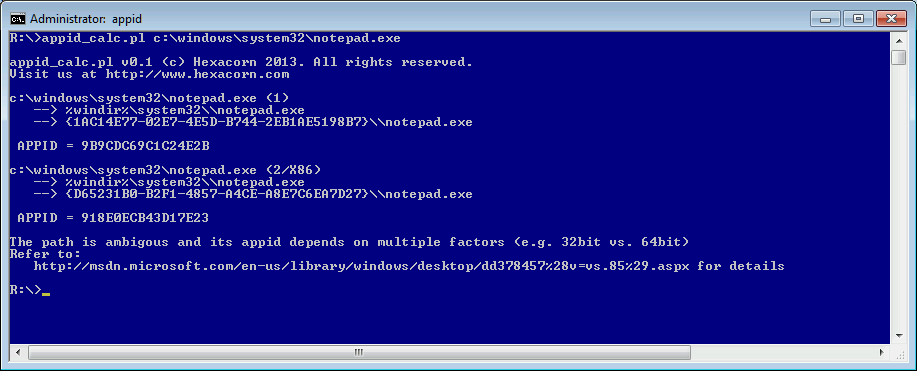
 Notepad

appid_4

You may notice that in this example there are 2 different AppIDs shown. This is because of the ambiguity I mentioned earlier; applications running on 64-bit systems can be executed in more than one configuration and since there is WOW64 folder redirection happening AppID needs to be calculated in a context.

The Notepad path looks the same to both 32- and 64-bit application (because of WOW64 folder redirection):

  • c:\windows\system32\notepad.exe

but the AppID depends on a type of Notepad .exe file:

  • if it is 32-bit, the AppID is 918E0ECB43D17E23
  • if 64-bit, the AppID is 9B9CDC69C1C24E2B.

This can be also confirmed via Forensic Wiki:

appid_6

Internet Explorer – via path

It gets even more complicated with Program Files folder as it has two versions – with and without (X86) and 32-/64- bit applications both ‘see’ Program Files the same way. As an example we could try to generate a hash for Internet Explorer in various configurations by running appid calculator and providing to it a path to c:\Program Files\Internet Explorer\iexplore.exe. As mentioned earlier IE uses an AppID that it sets up during the launch, so you should never see AppIDs shown on the screenshot below, but it is a simple example to show various configurations of Program Files folder using a well-known path.

appid_5

Again, I strongly suggest reading the Microsoft Article about KNOWNFOLDERIDs, The appid calculator provides a link to it as well if the path is known to be ambiguous (system32, program files, program files\common).

Download

You can find the script here. This is a first version, coded in a hurry so it may contain bugs. If you find any issues, please let me know. Thanks!

To run:

perl appid_calc.pl

If no argument is passed to it, it will calculate a few sample AppIDs – the examples illustrate various ways one can provide the path to the script:

  • c:\windows\notepad.exe
  • c:\windows\system32\notepad.exe
  • c:\windows\syswow64\notepad.exe
  • {1AC14E77-02E7-4E5D-B744-2EB1AE5198B7}\notepad.exe
  • c:\program files\Internet Explorer\iexplore.exe
  • MICROSOFT.INTERNETEXPLORER.DEFAULT