Prefetch file names and UNC paths

In one of the older posts, I talked about how the Prefetch file names are created. Today I was looking at program execution from network shares i.e. originating from the UNC paths and realized that I have not included these in the original article.

VM Shares

To test what happens, I launched WinXP under windbg and put a breakpoint on the hashing function and then executed a test file from a shared VM folder – the screenshot shows the mapping between the drive and the UNC path where the executable is placed:

Once executed, the windbg popped up and I could trace the full path to a file in a Memory window

As it seems, nothing really surprising:

  • z:\test.exe is executed
  • it is mapped to its UNC path \\vmware-host\Shared Folders\X\test.exe
  • which is then prepended with a device name responsible for HGFS file system (used internally by VM) to form a final string used in a hash calculation
  • \DEVICE\HGFS\VMWARE-HOST\SHARED FOLDERS\X\TEST.EXE

Real share

Now, that was the case with a ‘fake’ share created by the VM software.

What about a real share?

Following the same procedure:

  • I mapped a host \\H\C$ drive as N: inside the guest system with ‘net use’
  • and then executed N:\test.exe

The result shown below is not very surprising either as now the path refers to LANMANREDIRECTOR:

  • \DEVICE\LANMANREDIRECTOR\H\C$\TEST.EXE

Substed paths

And in case you are curious what happens to drives created with subst…

For drives mapped locally using ‘subst drive: path’ e.g.

subst g: .

there is no difference as the device will refer to HARDDISKVOLUME### (where ### is hard drive’s number) – I don’t include screenshot here as I hope this example doesn’t need one.

However, using subst in a slightly different way i.e. referring to target path via localhost’s IP: e.g.

subst g: \\127.0.0.1\c$

will make the Prefetch file name to be created using the following path:

  • \DEVICE\LANMANREDIRECTOR\127.0.0.1\C$\TEST.EXE

As you can see, each of the test files created a different hash

In other words, there is plenty of ways to abuse the file naming creation of the prefetch file and it’s quite hard to write an universal hash calculator to cover all these cases – it really depends on the environment and there are lots of tricks to confuse the system + I bet there are a few more that wait to be uncovered.
ZeroAccess death match with Shell_NotifyIconW

There is a lot of ZeroAccess analysis all over the place, so not sure if anyone documented it before, but oh well…  here it goes…

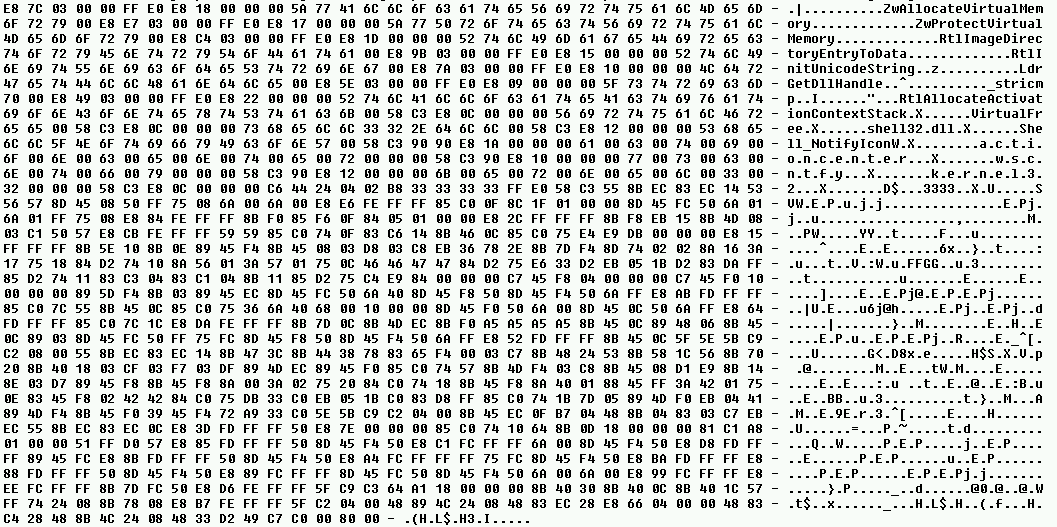
I have been recently looking at a new sample of ZeroAccess and spotted that at an early stage of the infection, it injects a small code into Windows Explorer:

The snippet is then executed via Asynchronous Procedure Call (NtQueueApcThread). Just looking at the size of the payload and the strings made me curious enough so I decided to have a quick look at the code.

Turns out, this little snippet doesn’t like Shell_NotifyIconW API very much and it patches it in a very clever and selective way.

The disassembled code of the main routine from the snippet looks like this:

The PatchShell_NotifyIconW function shown on the screenshot is responsible for allocating a small buffer in memory (via ZwAllocateVirtualMemory) that will hold a code of the function modifying the standard behavior of Shell_NotifyIconW API.

As per MSDN, the Shell_NotifyIconW function takes 2 arguments:

BOOL Shell_NotifyIcon(
  _In_  DWORD dwMessage,
  _In_  PNOTIFYICONDATA lpdata
);

The new function installed by ZeroAccess looks like this:

The 33333333h is an address (patched at run-time) to the old unpatched version of the function, so that once ZeroAccess modifies the function’s behavior it can pass the control back to the original function.

As you can see, the patch is simple – it only modifies a dwMessage value so that it is always equal to NIM_DELETE, which pretty much means that any attempts to add/modify/change status of an icon on the notification area (tray) will fail.

While I have not tested it as I don’t have any image with all these security settings on, it seems to be a simple trick to prevent the ‘annoying’  security notifications from happening while the malware is doing its evil thing. This is indirectly confirmed by the way the actual patch occurs. Instead of patching the entry code of Shell_NotifyIconW in a typical, process-global detour-like fashion, the malware walks through all DLLs loaded into Windows Explorer and finds addresses of Shell_NotifyIconW function only within the Import Address Tables  of two DLLs: ActionCenter.dll and wscntfy.dll. These hold the code responsible for the system/tray icon area notifications related to current security state of the system.

Quite frankly, I like this piece of code as it is very neatly written (it even self-removes itself from memory after it is executed) but more importantly, these popups are actually quite annoying! 🙂
