ZeroAccess death match with Shell_NotifyIconW

There is a lot of ZeroAccess analysis all over the place, so not sure if anyone documented it before, but oh well…  here it goes…

I have been recently looking at a new sample of ZeroAccess and spotted that at an early stage of the infection, it injects a small code into Windows Explorer:
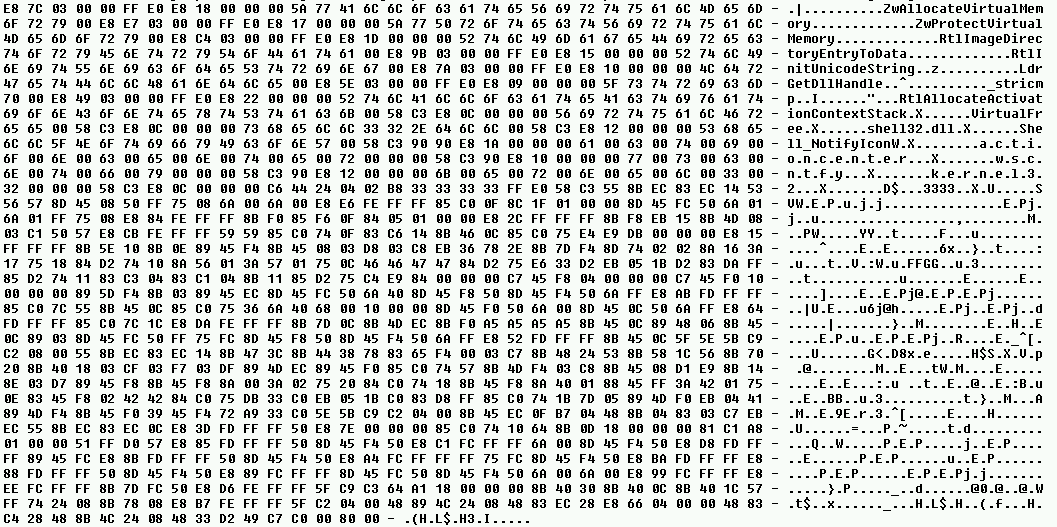
The snippet is then executed via Asynchronous Procedure Call (NtQueueApcThread). Just looking at the size of the payload and the strings made me curious enough so I decided to have a quick look at the code.

Turns out, this little snippet doesn’t like Shell_NotifyIconW API very much and it patches it in a very clever and selective way.

The disassembled code of the main routine from the snippet looks like this:

The PatchShell_NotifyIconW function shown on the screenshot is responsible for allocating a small buffer in memory (via ZwAllocateVirtualMemory) that will hold a code of the function modifying the standard behavior of Shell_NotifyIconW API.

As per MSDN, the Shell_NotifyIconW function takes 2 arguments:

BOOL Shell_NotifyIcon(
  _In_  DWORD dwMessage,
  _In_  PNOTIFYICONDATA lpdata
);

The new function installed by ZeroAccess looks like this:

The 33333333h is an address (patched at run-time) to the old unpatched version of the function, so that once ZeroAccess modifies the function’s behavior it can pass the control back to the original function.

As you can see, the patch is simple – it only modifies a dwMessage value so that it is always equal to NIM_DELETE, which pretty much means that any attempts to add/modify/change status of an icon on the notification area (tray) will fail.

While I have not tested it as I don’t have any image with all these security settings on, it seems to be a simple trick to prevent the ‘annoying’  security notifications from happening while the malware is doing its evil thing. This is indirectly confirmed by the way the actual patch occurs. Instead of patching the entry code of Shell_NotifyIconW in a typical, process-global detour-like fashion, the malware walks through all DLLs loaded into Windows Explorer and finds addresses of Shell_NotifyIconW function only within the Import Address Tables  of two DLLs: ActionCenter.dll and wscntfy.dll. These hold the code responsible for the system/tray icon area notifications related to current security state of the system.

Quite frankly, I like this piece of code as it is very neatly written (it even self-removes itself from memory after it is executed) but more importantly, these popups are actually quite annoying! 🙂


Beyond good ol’ Run key, Part 2

In my previous post I described various less-known autoruns mechanisms that can be utilized by malware. This post follows-up on some of the ideas I have described there and lists another batch of applications providing features that could be potentially used by malware authors. This is not to scaremonger users of these applications –  the features described here are actually very useful and needed, and certainly developed in the best interest of the users. Still, they are potential avenues for developing hidden autostart so with ‘the better evil known than unknown’ in mind, here it goes:

Winrar archiver

Allows to define external viewer:

The value is stored under the following registry location:

  • HKEY_CURRENT_USER\Software\WinRAR\Viewer\ExternalViewer

The other user-defined value worth remembering of is the AV scanner integration;

stored in the registry under the following path:

  • HKEY_CURRENT_USER\Software\WinRAR\VirusScan\Name

 WinZip Archiver

WinZip allows for creating Self-extracting archives, the task can be accomplished with a help of an externally defined application:

The value is stored under:

  • HKEY_CURRENT_USER\Software\Nico Mak Computing\WinZip\programs\zip2exe

Other interesting values:

  • HKEY_CURRENT_USER\Software\Nico Mak Computing\WinZip\programs\viewer
  • HKEY_CURRENT_USER\Software\Nico Mak Computing\WinZip\programs\vviewer

Winzip in version 10 and earlier allowed for an antivirus scan same way as WinRar. This feature has been removed from newer versions as explained in this article. The users of old WinZip 10 could define the path to various external programs including antivirus, executable for creating Self-extracting .exes, viewer, as well as 3 external applications to handle old 16-bit archivers ARJ, LHZ and ARC.

The user-defined values could be found in Registry:

  • HKEY_CURRENT_USER\Software\Nico Mak Computing\WinZip\programs\arc
  • HKEY_CURRENT_USER\Software\Nico Mak Computing\WinZip\programs\arj
  • HKEY_CURRENT_USER\Software\Nico Mak Computing\WinZip\programs\lha
  • HKEY_CURRENT_USER\Software\Nico Mak Computing\WinZip\programs\scan
  • HKEY_CURRENT_USER\Software\Nico Mak Computing\WinZip\programs\viewer
  • HKEY_CURRENT_USER\Software\Nico Mak Computing\WinZip\programs\zip2exe

Internet Download Manager

Downloading files from the internet is certainly not a safe operation and IDM allows to define what application will be executed and act an external AV scanner upon a file download:

The actual value is stored here:

  • HKEY_CURRENT_USER\Software\DownloadManager\VScannerProgram

Download Accelerator Plus (DAP)

The very same functionality is present in DAP:

and the value is stored here:

  • HKEY_CURRENT_USER\Software\SpeedBit\Download Accelerator\AntiVirusEXE

 Orbit Downloader

Another popular downloader also offers the antivirus scan functionality:

This time the user-defined value is stored not in Registry, but in a configuration file:

  • %USERPROFILE%\Application Data\Orbit\conf.dat

e.g.

c:\Documents and Settings\user\Application Data\Orbit\conf.dat

 Windows Live Messenger

Instant Messenger applications also allow for defining applications that will be executed upon arrival of a file from the other users of IM. Such setting is present in WLM as well:

The actual value is stored under MSNMessnger branch:

  • HKEY_CURRENT_USER\Software\Microsoft\MSNMessenger\AntiVirus

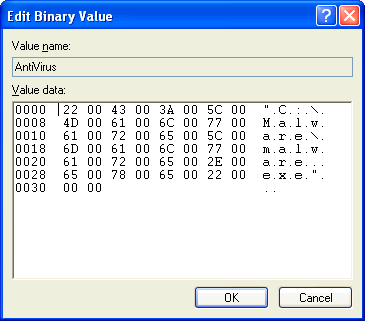
The value is stored as a binary and in this case data is just an UnicodeZ string

Miranda

Another popular IM that offers antivirus scan is Miranda:

the value is stored in a file in the following location:

  • %USERPROFILE%\Application Data\Miranda\PROFILEFOLDER\PROFILEFILENAME.dat

e.g.

c:\Documents and Settings\user\Application Data\Miranda\foo\foo.dat

It took around 2 hours to download all these applications, test them and write this blog entry. Not a thorough and very advanced research as you can see, but this is what it takes to find new stuff. If you have some spare time and like (or want to learn how) to write a new RegRipper plugin, perhaps now it’s a good time to give it a go 🙂 Thanks for reading!