De Low Life of a DLL name

Coding is boring. We often re-use the same code tweaking it according to our needs. I do it all the time. Turns out that OS developers do the very same thing. It can be revealed by comparing the external names of DLLs (file names) and their internal names hidden inside the export directory.

The below is a list from a random Windows 7 installation

  • bold=name in export directory
  • note: I excluded the hotifexes/updates to make the list shorter, but if you have look at them you will see that the DLLs are being updated many times and QA process still doesn’t catch them
  • note: some changes can be probably explained via historical needs (8.3 naming convention)
  • the same name inside the export directory means developer(s) simply copy&paste code for different DLLs (smalldll.dll is popular amongst them 🙂 )

dummysbs.dll

  • C:\WINDOWS\Microsoft.NET\Framework\sbs_iehost.dll
  • C:\WINDOWS\Microsoft.NET\Framework\sbs_VsaVb7rt.dll

exports.dll

  • C:\WINDOWS\ie8\ieencode.dll
  • C:\WINDOWS\system32\ieencode.dll

INETCPL.dll

  • C:\WINDOWS\system32\inetcpl.cpl

mpsystemstatecheck.dll

  • <various>\mpsyschk.dll

msconv97.pex

  • <various>\msconv97.dll

MSMSGSC.dll

  • <various>\msgsc.dll

PresentationHost.dll

  • C:\WINDOWS\Installer\$PatchCache$\Managed\5C1093C35543A0E32A41B090A305076A\4.0.30319\PresentationHostDLL_X86.dll
  • C:\WINDOWS\Microsoft.NET\Framework\v4.0.30319\WPF\PresentationHost_v0400.dll

smalldll.dll

  • C:\WINDOWS\system32\MP43DMOD.dll
  • C:\WINDOWS\system32\MP4SDMOD.dll
  • C:\WINDOWS\system32\MPG4DMOD.dll
  • C:\WINDOWS\system32\wdfapi.dll
  • C:\WINDOWS\system32\wmp.ocx
  • C:\WINDOWS\system32\wmpcd.dll
  • C:\WINDOWS\system32\wmpcore.dll
  • C:\WINDOWS\system32\wmpui.dll
  • C:\WINDOWS\system32\wmsdmod.dll
  • C:\WINDOWS\system32\wmsdmoe2.dll
  • C:\WINDOWS\system32\WMVADVD.dll
  • C:\WINDOWS\system32\WMVADVE.DLL
  • C:\WINDOWS\system32\wmvdmod.dll
  • C:\WINDOWS\system32\wmvdmoe2.dll

Beyond good ol’ Run key, Part 28

I was curious if any of the phantom DLLs that I wrote about before still exist on Windows 10 TP. It turns out that they do, but less of them exist than could leveraged as a persistence mechanism when compared to the older versions of OS.

Here is a list of groups I found; the process name is in bold and if you see the DLL name in the parenthesis (following the process name) it means that particular DLL is responsible for loading the actual phantom DLL.

%SYSTEM%\Dism.exe (WimProvider.DLL)
  • %SYSTEM%\Dism\wimgapi.dll
%SYSTEM%\Dism.exe
  • %SYSTEM%\DismCore.dll
%SYSTEM%\FileHistory.exe (clr.dll)
  • %WINDOWS%\Microsoft.NET\Framework\v4.0.30319\api-ms-win-core-winrt-l1-1-0.dll
  • %WINDOWS%\Microsoft.NET\Framework\v4.0.30319\mscoree.dll
  • %WINDOWS%\Microsoft.NET\Framework\v4.0.30319\ole32.dll
  • %WINDOWS%\Microsoft.NET\Framework\v4.0.30319\urlmon.dll
%SYSTEM%\mmc.exe (clr.dll)
  • %WINDOWS%\Microsoft.Net\assembly\GAC_32\mscorlib\v4.0_4.0.0.0__b77a5c561934e089\oleaut32.dll
  • %WINDOWS%\Microsoft.Net\assembly\GAC_32\mscorlib\v4.0_4.0.0.0__b77a5c561934e089\shell32.dll
  • %WINDOWS%\Microsoft.Net\assembly\GAC_MSIL\MIGUIControls\v4.0_1.0.0.0__31bf3856ad364e35\ntdll.dll
  • %WINDOWS%\Microsoft.Net\assembly\GAC_MSIL\System.Windows.Forms\v4.0_4.0.0.0__b77a5c561934e089\comctl32.dll
  • %WINDOWS%\Microsoft.Net\assembly\GAC_MSIL\System.Windows.Forms\v4.0_4.0.0.0__b77a5c561934e089\uxtheme.dll
  • %WINDOWS%\Microsoft.NET\Framework\v4.0.30319\api-ms-win-core-winrt-l1-1-0.dll
  • %WINDOWS%\Microsoft.NET\Framework\v4.0.30319\mscoree.dll
  • %WINDOWS%\Microsoft.NET\Framework\v4.0.30319\ole32.dll
  • %WINDOWS%\Microsoft.NET\Framework\v4.0.30319\VERSION.dll
%SYSTEM%\Narrator.exe (MSTTSEngine.DLL)
  • %SYSTEM%\speech\engines\tts\MSTTSLocEnUS.DLL (I have not explored it, but there is a possibility that on non-English Windows it would be a different localization DLL)
%SYSTEM%\omadmclient.exe
  • cmnet.dll
%SYSTEM%\PresentationHost.exe
  • %WINDOWS%\Microsoft.NET\Framework\v4.0.30319\WPF\PresentationHost_v0400.dll
%SYSTEM%\provtool.exe (ProvEngine.dll)
  • MvHelper.dll
%SYSTEM%\SearchIndexer.exe
  • %SYSTEM%\msfte.dll
  • %SYSTEM%\msTracer.dll
%SYSTEM%\SearchProtocolHost.exe
  • %SYSTEM%\msfte.dll
  • %SYSTEM%\msTracer.dll

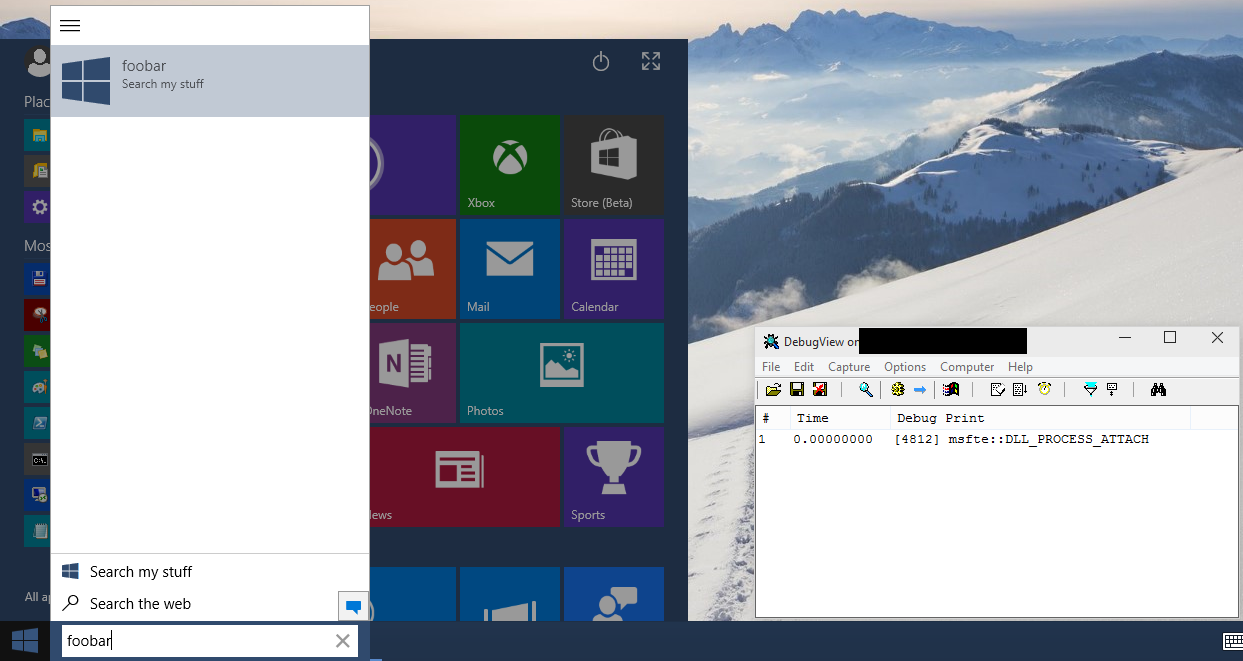
Probably the most interesting are SearchIndexer.exe and SearchProtocolHost.exe as they are running by default. Here is a screenshot capturing the moment when %SYSTEM%\msfte.dll is present on the system and user types something in the Search Box

msfte