Bye Bye EDR…

Update

If you had read the below post and it made you blood boil, mission accomplished šŸ˜‰ Just kidding. The idea of the post was and still is this – to raise the question: what is the value of EDR and how to measure it? I am assuming the value is there, but it’s lower than expected. I was myself quite shocked when I had to come to terms with this observation.

And just in case – this was a vendor-independent statement. I woke up one morning, and realized that I have expectations towards EDR and we are pretty far today from these expectations to be met.

So, while shots were fired, the question remains: how do we assess the value of EDR?

For comparison: AV is looked at in a very harsh way. The expectation is to cover 100/100.

Can we apply the same assessment criteria to EDR?

I’d love to see high-fidelity alerts only from EDR. But I know it’s impossible.

What’s the acceptable ratio then? 30%?

This is a valid question, because in a large organization you need resources to eyeball all these mail alerts andĀ  dashboards. And expectations should be set for the analysts who process this data.

And if the ratio of the TP is low, you end up looking at events most of the day, and all day long and hey… isn’t the whole idea of tools like EDR to recognize the incidents in the flood of events… ?

Old post

I officially lost faith in EDR.

I know that for some it works. It does work for me too. Sometimes. But… more often that that – it doesn’t.

I am done with the EDR.

Its alerting is following the paths of firewall, IDS, DLP, windows event logs, and… yara rules. Lots of alerts, poor ROI.

Arrivederci EDR.

AV beats EDR in so many aspects. It’s high fidelity. It’s precise. Its heuritics feeds are often better. It also offers remediation and it is undo-able. It even prevents bad stuff from running.

EDR is kaputt.

It assigns value to so-much-hated signatures. The form has changed, but the result is the same. You only see what you can write a rule for. And then you see it, and it’s surrounded by so many FPs. You probably suck at writing rules. Except many are not written by you and come from the other threat hunting experts.

EDR is a waste of money, and time. Now, there you have it – I’ve said it.

EDR was a nice utopia. I believed it for a while. In a perfect world you can gather all these logs and gather intel about activities on the system, of the user, network events, and then profile various scenarios and look at the dashboard happily cherry-picking the bad guys. A nice placebo in the absence of better solutions, despite them being available for a long time (f.ex. whitelisting).

But in reality you face the alarm fatigue, and suffer from infobesity.

EDR stands for Endpoint Detection and Response. It’s neither Detect nor Response. But in my books, it’s defo at the end point.

Posted in EDR

Using RegisterApplicationRestart as a (lame) sandbox evasion

The RegisterApplicationRestart function allows the OS to relaunch the application in case it crashes, or fails for other reasons (or when an installer needs to restart the system and then launch again).

To avoid cyclical restarts the program needs to run for at least 60 seconds though.

So, imagine a program that does the following:

  • Check if a specific command line argument is provided
    • If yes
      • Run malware
    • If no
      • Register itself via RegisterApplicationRestart and provide a command line f.ex. /nosandbox
      • Sleep for 60 seconds using Sleep
      • Cause a crash (f.ex. divide by 0)

If the application is ran w/o a sandbox, it will be relaunched by the OS after the crash and with a /nosandbox argument – it will execute the malware.

If the application is ran under sandbox, the sandbox engine will most likely affect the running of the Sleep function. This in turn will disable the functionality of the RegisterApplicationRestart function. The program will run less than 60 seconds, hence won’t be restarted after the crash. The sandbox report will be pretty much empty.

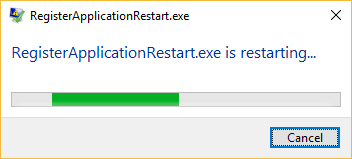
Note, with its default settings, Windows 10 will simply restart the application:

For earlier versions, the user may be asked to choose whether they want to restart the application (depending on Windows Error Reporting settings). Notably, if such dialogĀ  popped up while the sample was running inside the sandbox, there is a chance the sandbox would autoclick the ‘restart’ option for us. But then… well.. it would have to wait these 60 seconds first, wouldn’t it?

Bonus forensic information:

The less used option of RegisterApplicationRestart API is in conjunction with installers. If combined with ExitWindowsEx,EWX_RESTARTAPPS,… it will register the app to be executed by the systems with the next logon. The mechanism of this temporary persistence mechanism is quite interesting.

Right before the user is logged off the csrss.exe process registers a RunOnce entry located in the following location:

  • HKCU\Software\Microsoft\Windows\CurrentVersion\RunOnce\Application Restart #<NUMBER>

– it is simply pointing to the restarted application.

So, if you ever see entries like these:

  • HKCU\Software\Microsoft\Windows\
    CurrentVersion\RunOnce\Application Restart #0
  • HKCU\Software\Microsoft\Windows\
    CurrentVersion\RunOnce\Application Restart #1

etc.

– then it’s most likely a result of an unfinished installer business…

Could it become a persistence mechanism and become a part of the Beyond Good Ol’ Run key series? Perhaps, but I have not found a practical way to do it w/o restarting the system (perhaps aborting the restart could help, but from what I can tell the csrss.exe registers the RunOnce persistence mechanism pretty late).