It is a well-known fact that Windows features are the best persistence mechanisms, and… the one I am going to talk about is yet another one of these…
If you ever ran into a problem of having not enough space on your hard drive you are certainly familiar with the Disk Cleanup program:

It turns out that the list of the ‘Files to delete’ that we see on the GUI is not random. It is pulled from this Registry node:
- HKLM\SOFTWARE\Microsoft\Windows\
CurrentVersion\Explorer\
VolumeCaches
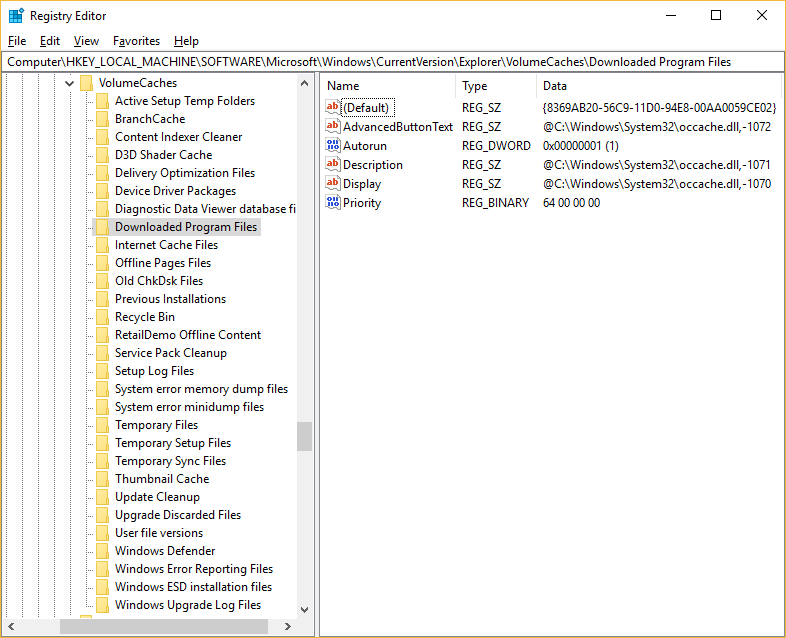
So, it would seem the list is dynamic and we can add entries to it.
Indeed.
The process is actually well-documented in this Microsoft’s article: Registering a Disk Cleanup Handler.
So, adding these entries:
- HKLM\SOFTWARE\Microsoft\Windows\
CurrentVersion\Explorer\VolumeCaches\
BadGuy=<BADCLSID> - HKCR\CLSID\<BADCLSID>\
InProcServer32 = <BADDLL>
will launch the BADDLL anytime Clean Manager tool is launched. Notably, the GUI won’t show the BadGuy entry (unless additional required Registry entries are populated – refer to the information in the Microsoft article I provided the link to)!
In my previous post I speculated that in some cases it is possible to design LOLbinish persistence mechanisms. We can start by adding e.g. Run key pointing to a legitimate OS binary and then ensure that when it’s launched during logon process it will run the second stage of the persistence mechanism. The Werfault program was a good example, and the Disk Cleanup program falls into this category as well!
The executable that launches the Disk Cleanup is called cleanmgr.exe. Adding it to run during the start-up may not be the best idea, because it has a GUI, but… there are always command line arguments of this program that we can use e.g.
- /autoclean
- /setup
Indeed, adding ‘cleanmgr /autoclean’ to ‘cleanmgr /setup’ to the ‘typical’ start-up place e.g. Run key will ensure that there is no GUI when the cleanmgr.exe is launched, and in a background, the plug-ins are loaded as well. Including the bad one.
From a forensic perspective, cleanmgr.exe updates the files in the following location:
- c:\WINDOWS\system32\LogFiles\setupcln\setupact.log
c:\WINDOWS\system32\LogFiles\setupcln\setuperr.log
I have not seen these files being updated with any references to the plug-ins loaded, but it could be a helpful artifact nevertheless…
And… there is more…
The Disk Cleanup has a few more tricks for us to exploit.
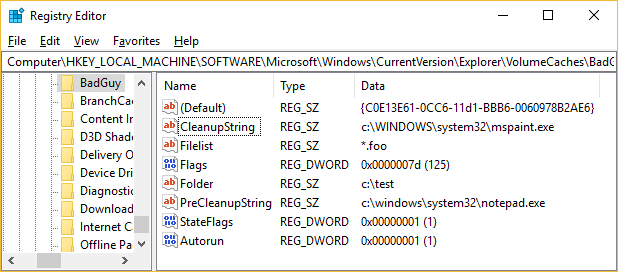
Many entries that we see listed under the VolumeCache node point to {C0E13E61-0CC6-11d1-BBB6-0060978B2AE6}. This CLSID refers to c:\Windows\System32\dataclen.dll file which is a generic folder and file deletion tool!
The values it relies on are:
- Folder – where to look for files to delete e.g. c:\test (refer to Microsoft article for a syntax for multiple entries)
- Files – what files to look for e.g. *.foo (refer to Microsoft article for a syntax for multiple entries)
- StateFlags=1 – an internal flag
- Flags = 1 – a documented flag, here means ‘run the plug-in’, but it can also tell the tool to do more things (refer to Microsoft article for details)
Once these are set-up the program will search for the file(s) inside the folder(s) as per the Registry values. If any is found it will remove them as usual…
BUT
if any of these values exist:
- PreCleanupString – a path to the program that will be executed prior to clean-up
- CleanupString – a path to the program that will be executed after the clean-up
it will also execute these programs prior and after the deletion!
Sounds interesting?
To trigger this one has to constantly drop c:\test\somefile.foo on the system. This will ensure the deletion library finds something to do and uses these two cleanup string entries and… these programs will be automatically executed.
So…
One can add their own entry, or modify the existing entries e.g.:
- Diagnostic Data Viewer database files
- CleanupString = rundll32.exe utcutil.dll,DiskCleanupEnd
- PreCleanupString = rundll32.exe utcutil.dll,DiskCleanupStart
- Windows Error Reporting Files
- PreCleanupString = wermgr.exe -purgestores
- etc.
There is also a dangerous bit. One could use this mechanism to delete any folder/file on the system…
Lastly, if you want the PreCleanupString / CleanupString programs to be launched w/o gui, i.e. while using e.g. /autoclean command line switch, just need to a dword value Autorun=1 to the same branch in the Registry e.g.: