Every once in a while you will run into samples that themselves do not run.
Some use anti- techniques, some require command line arguments, command line input, others require configuration and/or data files, and then some fail if the specific network resource is no longer available, plus there are some that may be password-protected or their successful payload decryption relies on victim system-specific guardrails…
In this post I will look at a slightly different category of samples that fail at first run:
- these that do so due to missing libraries, and/or missing manifest files.
The first category sounds pretty straightforward; I have seen many samples that depend on one or more external libraries, and these may not be present on the OS, f.ex.:
- samples linked to bcrypt.dll can’t be executed on Windows XP
- ATM malware samples can’t be tested as they require ATM framework DLLs
- samples requiring Visual Studio runtime libraries/Visual C redistributables
- samples requiring specific version of mfcXXX.dll, msvcpXXX.dll, vcruntimeXXX.dll, etc. (both Release and Debug versions)
- samples written in Delphi relying on external BPL files
- .NET samples can’t be executed w/o specific .NET framework version being installed
- Visual Basic samples can’t be executed w/o some OCX files registered on the system first
- samples relying on cygwin libraries
- samples relying on OpenGL libraries
- in the past samples missing specific versions of DirectX
- and so on, and so forth…
As you walk through these samples, you eventually end up collecting these libraries, one by one, for both 32- and 64-bit architectures, so that when the time comes, you can just drop them in the same directory as the tested sample. Obviously, there are many ways to skin the cat here, so you can proactively drop/preinstall all of them in a System32 directory or any other directory that the PATH environmental variable ‘sees’, You will definitely benefit from preinstalling as many redistributables packages, .NET framework installers as possible as well. Why not…
The missing manifest file is a very similar case…
Problems with samples missing a manifest file manifest (pun intended) themselves with a Message Box stating more or less the following:
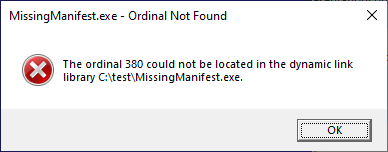
MissingManifest.exe – Ordinal Not Found
The ordinal 380 could not be located in the dynamic link library C:\test\MissingManifest.exe.
OK
This message is very misleading, because it blames the executable file, but in reality, the culprit is really this executable’s manifest.
This is a very common case for samples that rely on (link to, statically) COMCTL32.dll library. The library is responsible for visual styles, and to ensure we always link the compiled executable to the ‘newer’ version of this library (6+ instead of default 5 – see this post for more details), we need to use a manifest. Nowadays, such manifest is usually present by default inside the PE file .rsrc section, and we don’t even need to think of it too much, but on occasion, you will still find samples that don’t have it in their resources. In such case, running a sample that refers to these APIs (either via a name or an ordinal) from version 6 will simply fail…
To execute these samples you need to add a ‘.manifest’ file in the same directory as the sample, and have it named using the file name of the executable, with an appended ‘.manifest’ extension; that is – for a sample.exe file, we need to add a file sample.exe.manifest.
The content of this file (for 64-bit architecture) may look like this. The supportedOS sections list all the Windows versions from Vista till Windows 11, at least as per this article. Of course, instead of a manifest file, you can also modify the .rsrc section of the file and add this manifest there.
In most cases, if you see a sample that is missing a manifest for COMCTL32.dll library the chances this sample will need some other additional files is still pretty high.