HexDive 0.6 – new strings and more -Context…

Update

I have received a question from Pedro about the APIs that are commonly used by keyloggers which I mentioned in a context of one of the screenshots; The APIs I had in mind were MonitorFromPoint and GetMonitorInfoA (used for taking screenshots on multiple monitors) and a few others that can be seen on both screenshot and inside the example_hdive_qC.txt file; this was an ambiguous statement for a few reasons (APIs can be part of a clean framework or unit/module, keylogger is not an infostealer, etc.), so I am clarifying it for the future reader;

Last, but not least – obviously the only way to confirm that any APIs highlighted by HexDive are used for malicious purposes is by doing more in-depth analysis – the only thing HexDive does is identification of APIs and strings of interest for the malware analyst 🙂

Old post

New version is 25% larger (what a bloatware! :)) as it brings in a huge number of new strings:

  • PE Section names and other packer identifiers
  • Installer-related strings
  • Identifiers of script-to-exe type tools e.g. perl2exe, py2exe, exerb, winbatch
  • Lots of known CLSID strings

It slowly gets to the point where I wanted it to be when I started writing it. I also think I finally got it right on how to present the data extracted from a file in a way that:

  • shows as many interesting strings as possible
  • makes it as readable as possible
  • with all that it still provides information about the string’s context
  • allows to quickly find the string in a hex editor
  • in a full-output mode allows for an easy parsing
  • avoid missing strings as much as possible

So, with all that said, the new contextual output is introduced in this version.

It works the same way as the old version -c, but it removes keywords and duplicated lines from output (not perfectly, but good enough). I must mention here that contextual output requires a wide screen (terminal at least 120 columns), but I hope if you do malware analysis you have this available 🙂  (feel free to let me know if you need a more narrower output, so I can accommodate that in a future version).

The new contextual output option is available as capitalized -c i.e. -C – You can run it in many ways, e.g.

hdive -C
hdive -aC
hdive -afC

See example below and as usual, I would be grateful if you let me know if it works for you or if you spot issues.

Example Session

This is a sample of a new malware, downloaded quite recently.

Running hdive on it first:

hdive -C // note capital letter


The file is UPXd, and we can see some Borland strings (Boolean/False/True/Char/etc.).

We can unpack it using upx.exe

upx -d test\sample.exe -o test\sample.exe.unpacked

…and then run hdive again:

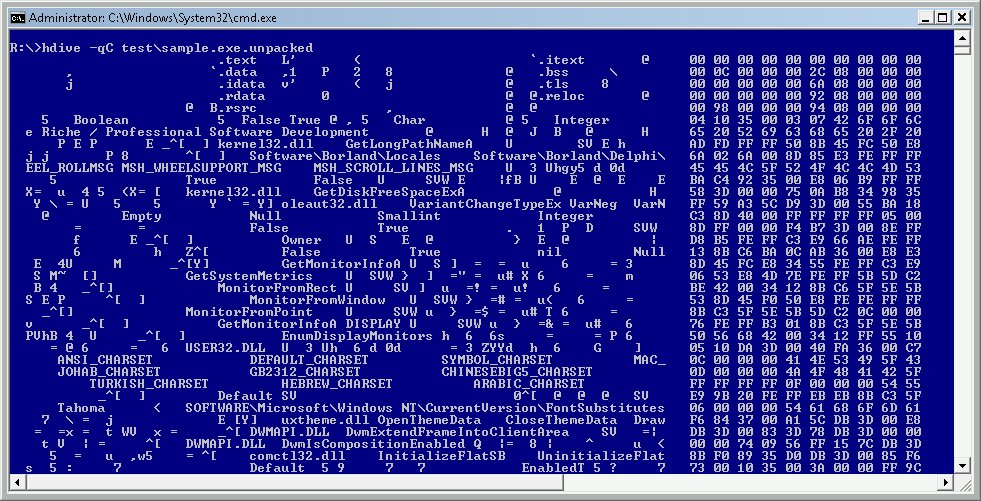
hdive -qC test\sample.exe.unpacked

Now it looks much better and it’s definitely Borland.

Scrolling down we can see lots of juicy info – APIs that are commonly used by keyloggers,
then going further, we can see winsock functions and strings, as well as Delphi components (units) listed as well together with ‘username’, ‘password’:

and finally lots of HTTP-related strings, as well as another unit-name from Borland:
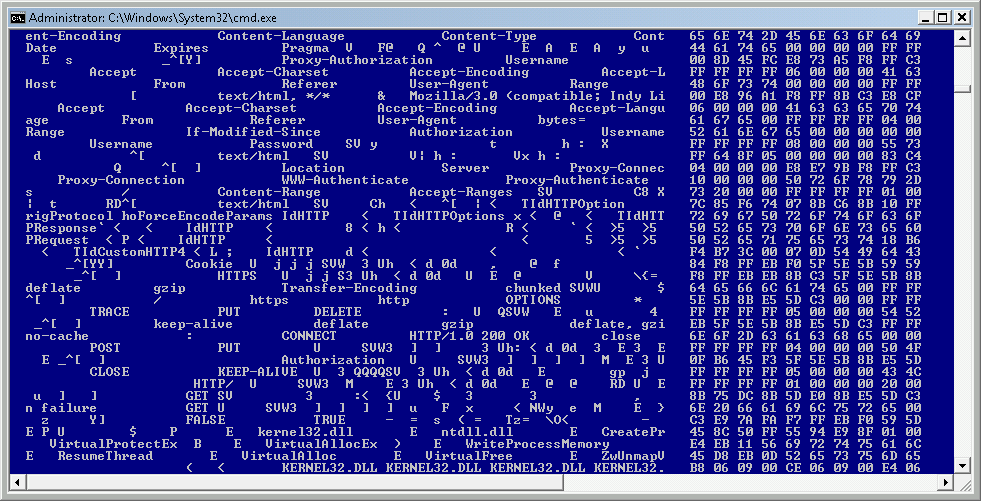
There are more interesting strings there – you can see output of the command by viewing all the attached text files; read on.

Out of curiosity, I compared the output of the following commands:

  • strings -q -n 6 // this is usually a good length allowing removing a lot of junk
  • hdive -q
  • hdive -qC

on the very same sample and then compared the file sizes and number of lines in each file.

These are the results:

dir example_*
2012-10-19  01:24            17,185 example_hdive_q.txt
2012-10-19  01:24            61,364 example_hdive_qC.txt
2012-10-19  01:24            58,199 example_strings_qn6.txt

wc -l example*   1336 example_hdive_q.txt    529 example_hdive_qC.txt   3777 example_strings_qn6.tx

It would seem (and mind you, it is a very subjective statement :)) that hdive can be quite a time saver! Instead of reviewing over 3.5K, you end up doing 35% of it and immediately getting juicy keywords and their context (this can be of course still improved).

You can download the files here:

  • examples:

Enjoy!

Random Stats from 1.2M samples – PE Section Names

update3

There is a newer version of this list here

update2

updated section list/fixed bugs – thanks to Nicolas Brulez and Tomislav Pericin (ap0x)

update

added one more list – List of popular section names

old post

I continue to batch analyze my malware collection and the latest list I generated contains:

  • The most popular PE file section names
  • The packer/protector section names/keywords – I tried to build a separate list of known section names/keywords that belong to known packers/protectors

You can find the lists below – please let me know if you find any mistakes (especially in packer sections’ names/attribution); Thanks!

The most popular PE file section names (top 100)

 658574 .rsrc   
 590338 .text   
 545976 .data   
 442607 .rdata  
 298316 .reloc  
 194273         
 178386 .idata  
 111369 .tls    
 109676 CODE    
 105309 DATA    
 100668 BSS     
  40293 UPX0    
  37838 UPX1    
  35164 .adata  
  35020 .bss    
  31336 .edata  
  28137 .ndata  
  15890 .itext  
  15451 .aspack
  12818 INIT    
   9665 UPX2    
   9376 .Upack  
   7727 PS      
   6786 .CRT    
   6628 .vmp0   
   6602 .nsp1   
   6590 .nsp0   
   6560 .code   
   6542 .sdata  
   6423 .nsp2   
   6270 .pdata  
   5710 tldksods
   5462 .       
   5395 Themida
   4313 .vmp1   
   4054 .MaskPE
   3926 PAGE    
   3721 .text-co
   3721 .data-co
   3314 rdata   
   3249 BitArts
   3035 .didata
   2886 idata   
   2881 .packed
   2803   @   @
   2707 .textbss
   2299 .text1  
   2257 .data1  
   2150 .petite
   2079 .texc   
   1926 Shared  
   1793 pebundle
   1714   u     
   1557 MEW F   
   1536 .UPX0   
   1513     t   
   1450 .data2  
   1434 text    
   1346 .RLPack
   1331 .vmp2   
   1300 .ex_cod
   1286 sdt     
   1280 mdata   
   1267 cdata   
   1263 sdata   
   1240 .pklstb
   1238 .MPRESS1
   1235 .MPRESS2
   1204 .UPX1   
   1201 .rdata p
   1191 .brdata
   1183 .udata  
   1131 .crt    
   1114 .sxdata
   1091 htomaota
   1083 .perplex
   1076 PAGEWMI
   1057 edata   
   1044 .delete
   1038 .relo2  
   1031 pec1    
   1015 .mackt  
   1009 PAGEDRV
    981 .svkp   
    980 .avp    
    969 .ByDwing
    967 .DATA   
    963 .debug  
    943 0 ext   
    899 .xdata  
    876 .ccg    
    865 .data ri
    857 .wqvwbj
    857 .kewyo  
    857 .axlgt  
    852 .spack  
    849     ta  
    839 .exc    
    824 .avc    
    807 PAGESYS

The packer/protector section names/keywords

  • .aspack – Aspack packer
  • .adata – Aspack packer/Armadillo packer
  • ASPack – Aspack packer
  • .ASPack – ASPAck Protector
  • .ccg – CCG Packer (Chinese Packer)
  • BitArts – Crunch 2.0 Packer
  • DAStub – DAStub Dragon Armor protector
  • !EPack – Epack packer
  • FSG! – FSG packer (not a section name, but a good identifier)
  • kkrunchy – kkrunchy Packer
  • .mackt – ImpRec-created section
  • .MaskPE – MaskPE Packer
  • MEW – MEW packer
  • .MPRESS1 – Mpress Packer
  • .MPRESS2 – Mpress Packer
  • .neolite – Neolite Packer
  • .neolit – Neolite Packer
  • .nsp1 – NsPack packer
  • .nsp0 – NsPack packer
  • .nsp2 – NsPack packer
  • nsp1 – NsPack packer
  • nsp0 – NsPack packer
  • nsp2 – NsPack packer
  • .packed – – RLPack Packer (first section)
  • pebundle – PEBundle Packer
  • PEBundle – PEBundle Packer
  • PEC2TO – PECompact packer
  • PECompact2 – PECompact packer (not a section name, but a good identifier)
  • PEC2 – PECompact packer
  • pec1 – PECompact packer
  • pec2 – PECompact packer
  • PEC2MO – PECompact packer
  • PELOCKnt – PELock Protector
  • .perplex – Perplex PE-Protector
  • PESHiELD – PEShield Packer
  • .petite – Petite Packer
  • ProCrypt – ProCrypt Packer
  • .RLPack – RLPack Packer (second section)
  • RCryptor – RPCrypt Packer
  • .RPCrypt – RPCrypt Packer
  • .sforce3 – StarForce Protection
  • .spack – Simple Pack (by bagie)
  • .svkp – SVKP packer
  • Themida – Themida Packer
  • .Themida – Themida Packer
  • .packed – Unknown Packer
  • .Upack – Upack packer
  • .ByDwing – Upack Packer
  • UPX0 – UPX packer
  • UPX1 – UPX packer
  • UPX2 – UPX packer
  • UPX! – UPX packer
  • .UPX0 – UPX Packer
  • .UPX1 – UPX Packer
  • .UPX2 – UPX Packer
  • .vmp0 – VMProtect packer
  • .vmp1 – VMProtect packer
  • .vmp2 – VMProtect packer
  • VProtect – Vprotect Packer
  • WinLicen – WinLicense (Themida) Protector
  • .WWPACK – WWPACK Packer
  • .yP – Y0da Protector
  • .y0da – Y0da Protector

List of popular section names

  • .arch – Alpha-architecture section
  • .bss – Uninitialized Data Section
  • .BSS – Uninitialized Data Section
  • .code – Code Section
  • .cormeta – CLR Metadata Section
  • .CRT – Initialized Data Section  (C RunTime)
  • .data – Data Section
  • .DATA – Data Section
  • .data1 – Data Section
  • .debug – Debug info Section
  • .debug$F – Debug info Section
  • .debug$P – Debug info Section
  • .debug$S – Debug info Section
  • .debug$T – Debug info Section
  • .didata – Delay Import Section
  • .edata – Export Data Section
  • .fasm – FASM flat Section
  • .flat – FASM flat Section
  • .idata – Initialized Data Section  (Borland)
  • .idlsym – IDL Attributes
  • .itext – Code Section  (Borland)
  • .ndata – Nullsoft Installer section
  • .pdata – Exception Handling Functions Section (PDATA records)
  • .rdata – Read-only Data Section  (Borland)
  • .reloc – Relocations Section
  • .rodata – Read-only Data Section
  • .rsrc – Resource section
  • .sbss – GP-relative Uninitialized Data Section
  • .sdata – GP-relative Initialized Data Section
  • .srdata – GP-relative Read-only Data Section
  • .sxdata – Registered Exception Handlers Section
  • .text – Code Section
  • .text1 – Code Section
  • .textbss – Section used by incremental linking
  • .tls – Thread Local Storage Section
  • .tls$ – Thread Local Storage Section
  • .udata – Uninitialized Data Section
  • .vsdata – GP-relative Initialized Data
  • .xdata – Exception Information Section
  • BSS – Uninitialized Data Section  (Borland)
  • CODE – Code Section (Borland)
  • DATA – Data Section (Borland)
  • edata – Export Data Section
  • idata – Initialized Data Section  (C RunTime)
  • INIT – INIT section (drivers)
  • PAGE – PAGE section (drivers)
  • rdata – Read-only Data Section
  • sdata – Initialized Data Section