Beyond good ol’ Run key, Part 20

Visual Basic is a goldmine when it comes to legacy code and some weird stuff (one example is – which doesn’t really matter for this post, but it’s just worth mentioning – that anytime a VB application exits it tries to find a .hlp file f.ex. \windows\system32\.hlp and if it finds it it will try to open it using a WinHelp API).

Anyway. In today’s post we describe yet another persistence mechanism related to VB which works on localized systems, but could be potentially adapted to English systems as well.

The idea is simple and it’s yet another example of a feature which is rarely used nowadays, but could be adapted for malicious purposes. It’s about localization DLLs that msvbvm60.dll loads by default when a VB application is launched on a non-English systems.

The naming convention for these DLLs is vb6<language code>.dll e.g. vb6ar.dll for Arabic, vb6ru.dll for Russian. Dropping these into e.g. c:\windows\system32\ will ensure that they are loaded anytime VB application starts (and exits).

Example for Russian system:

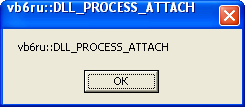
  • Application Start:
    vb6ru_attach


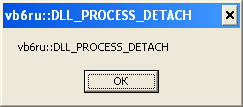
  • Application Exit:
    vb6ru_detach


Or, as seen in DebugView:

vb6ru

There is a bonus for OS where the language is set to Arabic or Hebrew. On such systems VB will attempt to load one more extra library called vbame.dll.

Dropping vbame.dll and vb6ar.dll inside c:\windows\system32 on Arabic Windows will ensure these DLLs are loaded anytime someone starts VB app:

vb6ar

The not so boring land of Borland executables, part 2

In the part 1 we explored the case of the resource timestamps that may come handy while building a timeline, or at least when you are trying to figure out when a specific Borland executable was compiled (I use ‘Borland’ here, but we know it means all the possible variations of Borland-esque compilers/products we can think of: Delphi, Borland C++, Code Gear, Embarcadero) .

The other interesting fact you may come across is the family of Borland files that are compiled with an old version of Borland C++. They have 2 very interesting and peculiar properties:

  • They have 2 exports: __GetExceptDLLinfo ___CPPdebugHook
  • They also include an original name of the executable

The first one makes it easy to recognize them.

The second one, while it may not be the most forensically interesting information it may still give you some clues for further research. It may come handy if the exported name is unique enough as it may allow e.g. to search for samples from the very same family (e.g. on Google, VirusTotal, Malwr)

For example, running the good-old pedump.exe over the file with a hash 3E19EF9C9A217D242787A896CC4A5B03 gives us the following:

exports table:

  Name:            winmgmtc.exe
  Characteristics: 00000000
  TimeDateStamp:   00000000 -> Thu Jan 01 08:00:00 1970
  Version:         0.00
  Ordinal base:    00000001
  # of functions:  00000002
  # of Names:      00000002

  Entry Pt  Ordn  Name
  00001059     1  __GetExceptDLLinfo
  0000C128     2  ___CPPdebugHook

The Export Directory is populated with the name of the original .exe and followed by 2 exports.

And yes, many online AV checkers/sandboxes do not show this information.

So, 2 things to remember now:

  • If it is an older Delphi file, check its resource section’s compilation timestamp
  • If it is Borland C++, check the export directory