Today I installed the latest version of Java SDK (8.0.660.17) for testing purposes. After the installation on the good ol’ XP I noticed that it created a folder named %userprofile%\.oracle_jre_usage. This looked interesting so I googled for it. Turns out lots of people spotted it in earlier version of Java and someone on Oracle forum even provides a good explanation as to what Java component it is from:
That is the default location for the Java Usage Tracker. See the Oracle docs
https://docs.oracle.com/javacomponents/usage-tracker/overview/
Since the folder is created even if the Usage tracker is disabled, we can leverage it as a yet-another-minor timeline-related artifact that can be potentially useful for cherry-picking two Java-related timestamps:
- when Java was installed (more or less, see below)
- when was the last time java.exe was launched (most likely to execute an application; I have not tested JRE & applets yet)
The folder ‘%userprofile%\.oracle_jre_usage’ is created during Java installation:
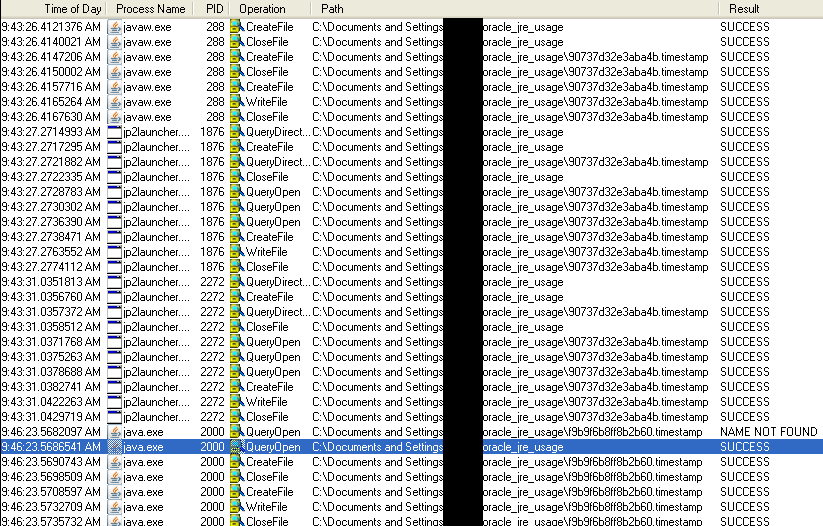
so you should find at least one randomly named file in this folder. In my case it was:
- 90737d32e3aba4b.timestamp
Inspecting its content shows a path leading to Java JRE and a timestamp in a format that appears to be a Unix timestamp with microseconds:

gives us 1446745410996 which roughly translates to 2015-10-05 09:43:30:996 – somewhere in-between the logs shown in Procmon output (could be a discrepancy between the time of retrieving of the timestamp and time of actually writing it to a file).
Running actual Java program causes the java.exe to look for ‘f9b9f6b8ff8b2b60.timestamp’ (refer to Procmon screenshot above) – this is randomly named file as well so if you look at the folder, you should see 2 of them.
If not found it’s created and its content is similar to ‘90737d32e3aba4b.timestamp’: the path and the Unix stamp.
The following screenshot shows how the Unix timestamp is changing anytime we run java.exe to execute a simple HelloWorld Java application (HelloWorld.class):
 To conclude: nothing ground breaking, but yet another pair of timestamps that may help with the investigation one day…