In my previous post I described various less-known autoruns mechanisms that can be utilized by malware. This post follows-up on some of the ideas I have described there and lists another batch of applications providing features that could be potentially used by malware authors. This is not to scaremonger users of these applications – the features described here are actually very useful and needed, and certainly developed in the best interest of the users. Still, they are potential avenues for developing hidden autostart so with ‘the better evil known than unknown’ in mind, here it goes:
Winrar archiver
Allows to define external viewer:

The value is stored under the following registry location:
- HKEY_CURRENT_USER\Software\WinRAR\Viewer\ExternalViewer
The other user-defined value worth remembering of is the AV scanner integration;

stored in the registry under the following path:
- HKEY_CURRENT_USER\Software\WinRAR\VirusScan\Name
WinZip Archiver
WinZip allows for creating Self-extracting archives, the task can be accomplished with a help of an externally defined application:
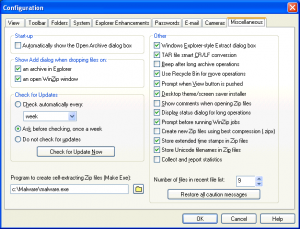
The value is stored under:
- HKEY_CURRENT_USER\Software\Nico Mak Computing\WinZip\programs\zip2exe
Other interesting values:
- HKEY_CURRENT_USER\Software\Nico Mak Computing\WinZip\programs\viewer
- HKEY_CURRENT_USER\Software\Nico Mak Computing\WinZip\programs\vviewer
Winzip in version 10 and earlier allowed for an antivirus scan same way as WinRar. This feature has been removed from newer versions as explained in this article. The users of old WinZip 10 could define the path to various external programs including antivirus, executable for creating Self-extracting .exes, viewer, as well as 3 external applications to handle old 16-bit archivers ARJ, LHZ and ARC.

The user-defined values could be found in Registry:
- HKEY_CURRENT_USER\Software\Nico Mak Computing\WinZip\programs\arc
- HKEY_CURRENT_USER\Software\Nico Mak Computing\WinZip\programs\arj
- HKEY_CURRENT_USER\Software\Nico Mak Computing\WinZip\programs\lha
- HKEY_CURRENT_USER\Software\Nico Mak Computing\WinZip\programs\scan
- HKEY_CURRENT_USER\Software\Nico Mak Computing\WinZip\programs\viewer
- HKEY_CURRENT_USER\Software\Nico Mak Computing\WinZip\programs\zip2exe

Internet Download Manager
Downloading files from the internet is certainly not a safe operation and IDM allows to define what application will be executed and act an external AV scanner upon a file download:

The actual value is stored here:
- HKEY_CURRENT_USER\Software\DownloadManager\VScannerProgram

Download Accelerator Plus (DAP)
The very same functionality is present in DAP:

and the value is stored here:
- HKEY_CURRENT_USER\Software\SpeedBit\Download Accelerator\AntiVirusEXE

Orbit Downloader
Another popular downloader also offers the antivirus scan functionality:

This time the user-defined value is stored not in Registry, but in a configuration file:
- %USERPROFILE%\Application Data\Orbit\conf.dat
e.g.
c:\Documents and Settings\user\Application Data\Orbit\conf.dat

Windows Live Messenger
Instant Messenger applications also allow for defining applications that will be executed upon arrival of a file from the other users of IM. Such setting is present in WLM as well:

The actual value is stored under MSNMessnger branch:
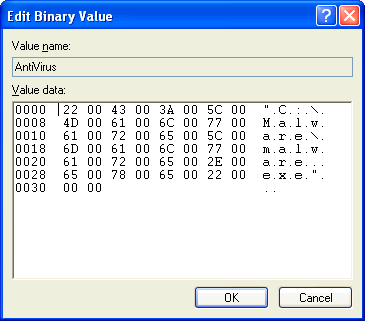
- HKEY_CURRENT_USER\Software\Microsoft\MSNMessenger\AntiVirus

The value is stored as a binary and in this case data is just an UnicodeZ string

Miranda
Another popular IM that offers antivirus scan is Miranda:

the value is stored in a file in the following location:
- %USERPROFILE%\Application Data\Miranda\PROFILEFOLDER\PROFILEFILENAME.dat
e.g.
c:\Documents and Settings\user\Application Data\Miranda\foo\foo.dat

It took around 2 hours to download all these applications, test them and write this blog entry. Not a thorough and very advanced research as you can see, but this is what it takes to find new stuff. If you have some spare time and like (or want to learn how) to write a new RegRipper plugin, perhaps now it’s a good time to give it a go 🙂 Thanks for reading!