Beyond good ol’ Run key, Part 27

Things are never boring in the Visual Basic world. In part 20 I described how localization DLLs can be used as a potential persistence mechanism on the localized systems. Today, we will look at yet another localization feature offered by this platform.

Application in VB can be marked as localized by changing their internal language ID (LCID). They may also include a name for the localization DLL (two of them, actually).

In the example below, we can see a VB application marked as localized to German (the LCID is set to German=407h), the MSVBVM60.DLL will attempt to load the DLL marked szLangDll as well as szSecLangDll (as long as the latter is not equal to ‘*’ as in the below example).
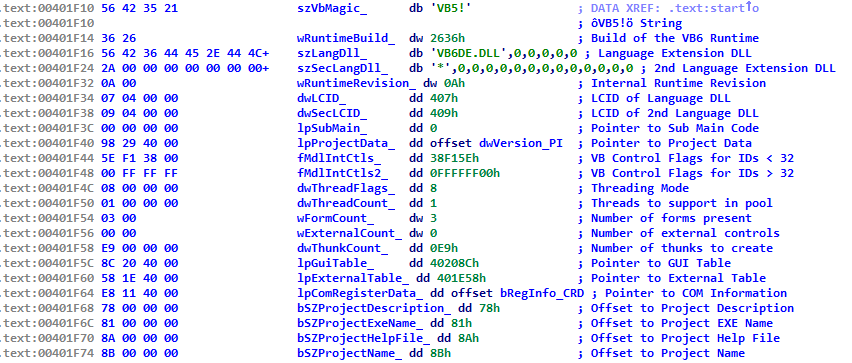
vb_localizedSo, one way to ensure persistence is to find an existing VB app on the system, modify its internal LCID to a value different than the one on a local system and then place the respective localization DLL in the system directory as described in part 20. Another way would be modifying the embedded szLangDll name to something else and such dll would be loaded. Thirdly, we could modify szSecLangDll from ‘*’ to anything we want and such DLL would be also loaded.

This is a pretty lame and is not far off from part 25 – a requirement to modify an executable is ridiculous for today’s standard, but I am adding it for completeness.

Bonus:

szSecLangDll is typically marked as ‘*’ – this is an internal marker that VB uses as an indicator telling the engine NOT to load the second localization DLL. Interestingly, I have seen Korean applications where this ‘*’ was changed to a tilde. I do not know why. If such application is found on the system this could be leveraged to develop a persistence mechanism based on such a tilde-based file name.

Have a look – we can see 3 persistence mechanisms at work here:

  • vb6ko.dll – described in part 20
  • HKLM\SOFTWARE\Microsoft\VBA\Monitors – described in part 6
  • ~.dll – described here as a result of Korean application using a non-standard szSecLangDll marker ‘~’ instead of ‘*’

tilde1

Beyond good ol’ Run key, Part 26

Today I cheated. I wrote two posts in a go, because 25 is not that interesting from the persistence perspective.

So, as promised 5 minutes ago, this post is about yet another Frankenstein’s monster. It focuses on a bug that I have already covered, but intentionally didn’t explore its most crazy aspect yet.

Bugs in dynamically loaded libraries are surely interesting, but even more interesting are the bugs in the libraries that are linked statically.

Why?

Because patching these is really hard and you can’t just submit a single patch to fix it all (unless you do some magic).

So, as mentioned above – the very same code that we have explored in the part 21 inside the MFC libraries is present in many popular applications as it’s linked with them statically.

This is bad news.

The result is that finding such vulnerable applications can give an attacker a myriad of persistence opportunities as all he has to do is to find a vulnerable static library pattern in a .exe or .dll and drop a ‘localization DLL’ in a respective directory. Yes, the statically linked code has a side effect and loads localization DLLs for DLLs as well. So if your foo.dll contains the vulnerable code, dropping fooENU.dll or fooLOC.dll on English system will ensure they are loaded as well.

There are really a lot of applications containing this buggy code. Looking through a couple of apps I was able to quickly spot them inside many omnipresent executables and DLLs.

So, without further ado, this is a very short list of files that I found to contain the specific vulnerable code:

  • %APPDATA%\Local\Akamai\ControlPanel.exe
    • %APPDATA%\Local\Akamai\ControlPanelENU.dll
    • %APPDATA%\Local\Akamai\ControlPanelLOC.dll
  • c:\Program Files (x86)\HP\HP Software Update\hpwucli.exe
    • C:\Program Files (x86)\HP\HP Software Update\hpwucliENU.dll
    • C:\Program Files (x86)\HP\HP Software Update\hpwucliLOC.dll
  • c:\Program Files\Realtek\Audio\HDA\RtHDVCpl.exe
    • C:\Program Files\Realtek\Audio\HDA\RtHDVCplENU.dll
    • C:\Program Files\Realtek\Audio\HDA\RtHDVCplLOC.dll
  • c:\Program Files\Realtek\Audio\HDA\RtkNGUI64.exe
    • C:\Program Files\Realtek\Audio\HDA\RtkNGUI64ENU.dll
    • C:\Program Files\Realtek\Audio\HDA\RtkNGUI64LOC.dll
  • c:\Program Files (x86)\Western Digital\WD Utilities\WDDriveUtilitiesHelper.exe
    • C:\Program Files (x86)\Western Digital\WD Utilities\WDDriveUtilitiesHelperENU.dll
    • C:\Program Files (x86)\Western Digital\WD Utilities\WDDriveUtilitiesHelperLOC.dll
  • C:\Program Files\Western Digital\WD SmartWare\WD Quick Formatter.exe
    • C:\Program Files\Western Digital\WD SmartWare\WD Quick FormatterENU.dll
    • C:\Program Files\Western Digital\WD SmartWare\WD Quick FormatterLOC.dll
  • c:\Program Files (x86)\ATI Technologies\ATI.ACE\Core-Static\SLSTaskbar.exe
    • C:\Program Files (x86)\ATI Technologies\ATI.ACE\Core-Static\SLSTaskbarENU.dll
    • C:\Program Files (x86)\ATI Technologies\ATI.ACE\Core-Static\SLSTaskbarLOC.dll

As you can see a few prominent vendors. It works for both 32- and 64-bit applications and DLLs.

This is a tip of the iceberg of course and if you scan any average hard drive you will surely find at least one vulnerable app like this.

I guess there may be even cases where such localization DLL can lead to an escalation of privileges if any of the vulnerable components is executed/loaded by a more privileged process/account.

Should this be reported as a vulnerability? Yes. But I really don’t know to whom.