Beyond good ol’ Run key, Part 70

Back in early 2000s shell extensions and desktop enhancers were very popular. Some of these ideas survived till today and even now one can either use pre-installed ones, or install new deskbands on the system.

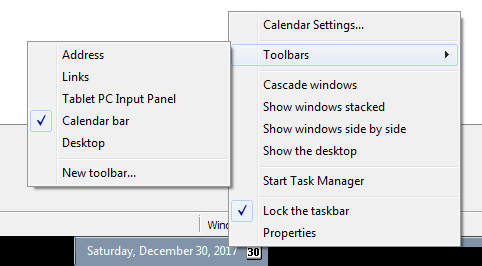
There are many coders who already did a great job explaining what desk bands are and how to implement them, so instead of pretending that I know what I am talking about, I will just suggest that you read this great article ‘Shell Extensibility – Explorer Desk Band, Tray Notification Icon et al.‘ by Alex Blekhman. When you run the Calendar.exe that is attached to the article you will then have an option to make the calendar present as a Deskband

Interestingly enough, as far as I can tell Autoruns still doesn’t detect them.

To find out where the information about deskbands and other Explorer extension bars is stored in Registry you can read this article.

If you are in a hurry, just need to enumerate Registry and look for all CLSIDs with the Implemented Categories\ key with the following deskband identifiers set:

DeskBand
{00021492-0000-0000-C000-000000000046}

VerticalBand 
{00021493-0000-0000-C000-000000000046}

HorizontalBand 
{00021494-0000-0000-C000-000000000046}

e.g.:

HKLM\SOFTWARE\Classes\CLSID\...\
Implemented Categories\{00021492-0000-0000-C000-000000000046}

Additionally, it may be worth checking the following key:

HKCU\Software\Microsoft\Windows\CurrentVersion\Explorer\
Discardable\PostSetup\Component Categories\...\Enum

This is where Explorer stores cached information about explorer bar objects.

Beating shields of EDR with the 16-bit setup

This is probably the most bizarre way of breaking the process tree you will see today, but well, it works, so there you go…

Have you ever wondered what these guys are?

  • C:\Windows\System32\InstallShield\setup.exe
  • C:\Windows\SysWOW64\InstallShield\setup.exe

Yup, me neither – until today.

Turns out that this is a very old school InstallShield setup program.

It has an interesting property that it is signed and exists on lots of versions of Windows.

It turns out that you can use it for at least two different purposes.

  • Side-load _setup.dll it relies on (signed .exe loading unsigned DLL)
  • Spawn .exe of your choice, breaking the process tree in a very lame way

The first one is trivial.

The second one is the really weird one – we have to create a fake setup directory layout that will allow us to execute program of our choice.

We need these files to pull it off:

  • _inst32i.ex_
    • the binary that is required by setup.exe; after toying around with an existing _inst32i.ex_ file from some old installation I came up with this minimalistic file layout that you need to save as _inst32i.ex_
00 : 2A AB 79 D8 00 01 00 00 00 00 00 00 00 00 00 00 *.y............. 000
10 : 00 00 00 00 00 00 00 00 00 00 00 00 00 00 00 00 ................ 016
20 : 00 00 00 00 00 00 00 00 00 00 00 00 00 00 00 00 ................ 032
30 : 00 00 00 00 00 00 00 00 00 00 00 00 00 00 00 00 ................ 048
40 : 00 00 00 00 00 00 00 00 00 00 00 00 00 00 03 00 ................ 064
50 : 00 00 00 00 00 00 00 00 00 00 00 00 00 00 00 00 ................ 080
60 : 00 00 00 00 00 00 0B 00 49 4E 53 54 41 4C 4C 2E ........INSTALL. 096
70 : 45 58 45 01 00 58 00 00 00 00 00 00 00 00 00 00 EXE..X.......... 112
80 : 00 00 00 00 00 00 00 00 00 00 09 00 7A 64 61 74 ............zdat 128
90 : 61 2E 64 6C 6C 01 00 5A 00 00 00 00 00 00 00 00 a.dll..Z........ 144
A0 : 00 00 00 00 00 00 00 00 00 00 00 00 0B 00 57 55 ..............WU 160
B0 : 54 4C 39 35 69 2E 44 4C 4C 01 00 58 00 00 00 00 TL95i.DLL..X.... 176
C0 : 00 00 00 00 00 00 00 00 00 00 00 00 00 00 00 00 ................ 192
D0 : 0A 00 42 4F 4F 54 31 36 2E 45 58 45 01 00 58    ..BOOT16.EXE..X  208
  • _setup.dll
    • already on the system
  • layout.bin
    • just type “echo > layout.bin”
  • setup.exe
    • already on the system, signed
  • SETUP.LID
[Languages]
key0=0009
Default=0009
count=1

Finally, the payload – save it inside this file:

  • xtract_all.exe

or, make xtract_all.exe a dummy and store the payload inside the  _isdel.exe file.

Now, all you have to do is to run:

setup.exe /extract_all /s

This will execute setup.exe in a silent mode, and will force it to launch both xtract_all.exe and _isdel.exe.

Interestingly, the _isdel.exe is launched from the same directory, but xtract_all.exe will be executed from the %TEMP% directory.

Yup. It’s complicated, I told you 😉

This can be taken a step further. Instead of using the /extract_all trick, you can actually generate your own _inst32i.ex_ file that may hold the payload. Since it’s an old proprietary InstallShield package file format, it is unlikely its content is scanned for malware. To generate a payload you may either use an InstallShield installer (if you can find one!), or.. reverse engineer the package file format…