Regedit.exe accepts two less known command line arguments:
When launched with any of these it will call the advpack.dll!RegInstallW function passing to it one of the section names (called RegExe or UnregExe respectively) that are defined inside the .inf file embedded directly in the regedit.exe file:
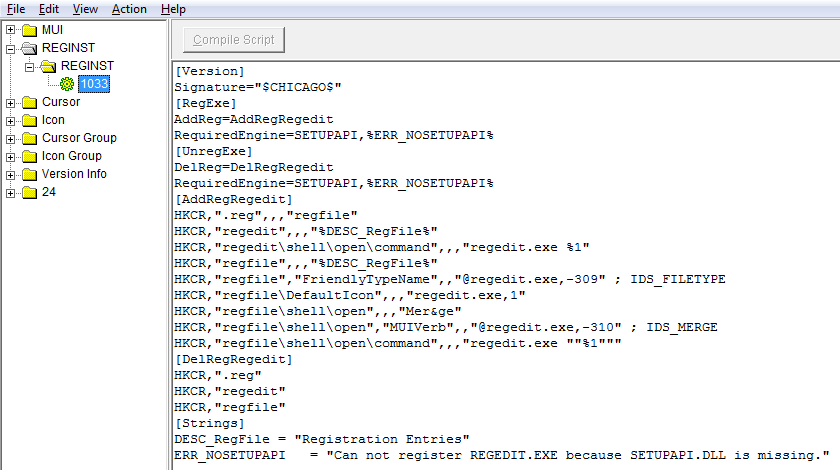
The extracted .inf file is first saved into a temporary file with a name %Temp%\RGI<random>.tmp file.
It is then interpreted like any standard .inf file.
One can use these commands to do at least two things:
- unregister regedit file association – see the pasted info below; other than damage, it may render some system repair more difficult (.reg files can’t be used)
- attempt to exploit a race condition and swap the temporary .inf file with one of attackers’, forcing regedit.exe to run the .inf file of attackers’ choice; it’s a tricky one to pull of, but the possibility exists
The Regshot diff from running the regedit /unregserver command on a test Windows 7 system is shown below:
----------------------------------
Keys deleted:17
----------------------------------
HKEY_LOCAL_MACHINE\SOFTWARE\Classes\.reg
HKEY_LOCAL_MACHINE\SOFTWARE\Classes\.reg\PersistentHandler
HKEY_LOCAL_MACHINE\SOFTWARE\Classes\regedit
HKEY_LOCAL_MACHINE\SOFTWARE\Classes\regedit\shell
HKEY_LOCAL_MACHINE\SOFTWARE\Classes\regedit\shell\open
HKEY_LOCAL_MACHINE\SOFTWARE\Classes\regedit\shell\open\command
HKEY_LOCAL_MACHINE\SOFTWARE\Classes\regfile
HKEY_LOCAL_MACHINE\SOFTWARE\Classes\regfile\DefaultIcon
HKEY_LOCAL_MACHINE\SOFTWARE\Classes\regfile\shell
HKEY_LOCAL_MACHINE\SOFTWARE\Classes\regfile\shell\edit
HKEY_LOCAL_MACHINE\SOFTWARE\Classes\regfile\shell\edit\command
HKEY_LOCAL_MACHINE\SOFTWARE\Classes\regfile\shell\open
HKEY_LOCAL_MACHINE\SOFTWARE\Classes\regfile\shell\open\command
HKEY_LOCAL_MACHINE\SOFTWARE\Classes\regfile\shell\print
HKEY_LOCAL_MACHINE\SOFTWARE\Classes\regfile\shell\print\command
HKEY_LOCAL_MACHINE\SOFTWARE\Classes\regfile\ShellEx
HKEY_LOCAL_MACHINE\SOFTWARE\Classes\regfile\ShellEx\{8895b1c6-b41f-4c1c-a562-0d564250836f}

----------------------------------
Values deleted:14
----------------------------------
HKEY_LOCAL_MACHINE\SOFTWARE\Classes\.reg\PersistentHandler\: "{5e941d80-bf96-11cd-b579-08002b30bfeb}"
HKEY_LOCAL_MACHINE\SOFTWARE\Classes\.reg\: "regfile"
HKEY_LOCAL_MACHINE\SOFTWARE\Classes\regedit\shell\open\command\: "regedit.exe %1"
HKEY_LOCAL_MACHINE\SOFTWARE\Classes\regedit\: "Registration Entries"
HKEY_LOCAL_MACHINE\SOFTWARE\Classes\regfile\shell\edit\command\: *%SystemRoot%\system32\notepad.exe "%1"*
HKEY_LOCAL_MACHINE\SOFTWARE\Classes\regfile\shell\open\command\: "regedit.exe "%1""
HKEY_LOCAL_MACHINE\SOFTWARE\Classes\regfile\shell\print\command\: *%SystemRoot%\system32\notepad.exe /p "%1"*
HKEY_LOCAL_MACHINE\SOFTWARE\Classes\regfile\shell\open\: "Mer&ge"
HKEY_LOCAL_MACHINE\SOFTWARE\Classes\regfile\shell\open\MUIVerb: "@regedit.exe,-310"
HKEY_LOCAL_MACHINE\SOFTWARE\Classes\regfile\ShellEx\{8895b1c6-b41f-4c1c-a562-0d564250836f}\: "{1531d583-8375-4d3f-b5fb-d23bbd169f22}"
HKEY_LOCAL_MACHINE\SOFTWARE\Classes\regfile\DefaultIcon\: "regedit.exe,1"
HKEY_LOCAL_MACHINE\SOFTWARE\Classes\regfile\EditFlags: 0x00100000
HKEY_LOCAL_MACHINE\SOFTWARE\Classes\regfile\: "Registration Entries"
HKEY_LOCAL_MACHINE\SOFTWARE\Classes\regfile\FriendlyTypeName: "@regedit.exe,-309"