Today we will look at yet another less-known persistence mechanism, and as a bonus – I will be talking about it twice. It only affects Windows XP so it’s a bit old, but there are still plenty of XP systems out there so I guess it still counts 🙂
The mechanism relies on the following Registry key:
-
HKCU\Software\Microsoft\Windows NT\CurrentVersion\Winlogon\RunGrpConv
The presence of the key and its non-zeroish value tells the system (userinit.exe to be precise) to launch grpconv.exe when user logs on. The grpconv.exe program itself is one of the migration applications designed to help converting Windows 3.1 groups to folders while upgrading to Windows 95+ – and now is obviously obsolete.
Persistence mechanism #1
Since the program is old and obsolete, most of people won’t even notice if it is gone. It’s also not protected by Windows File Protection so one could simply delete the legitimate grpconv.exe, replace it with a malicious program and set the registry key to ensure the program is launched every time user logs on.
This trick was successfully used by a malware family called Bredolab. The malware was also placing the file in a different location (%system%\wbem\grpconv.exe). You can see example malware report here.
You can experiment with this trick by replacing grpconv.exe on your test XP box with e.g. calc.exe. Once you restart the system (and log on) or simply log off and log on again you will notice that Calculator was launched…

and it’s even before Windows Explorer is loaded:

Persistence mechanism #2
The fact that grpconv.exe can be loaded every time user logs on is cool. Even cooler is the fact that it is an old school app and as such it relies on external libraries that are no longer present on the system. When executed, grpconv.exe attempts to load a non-existing imm.dll DLL.
So, adding the RunGrpConv key and dropping a malicious imm.dll will lead to its loading and execution anytime user logs on.
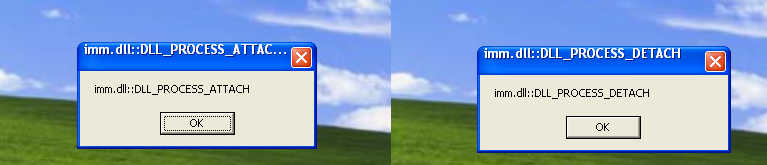
A variant of this trick was previously described here.
