Windows 11 brings us a lot of new Shim-related goodies and it makes sense to cover at least some of them.
In the second part of this series I listed a number of process names that are treated in a special way by the existing shim database entries.
It turns out that the list of these process names has been extended by at least two:
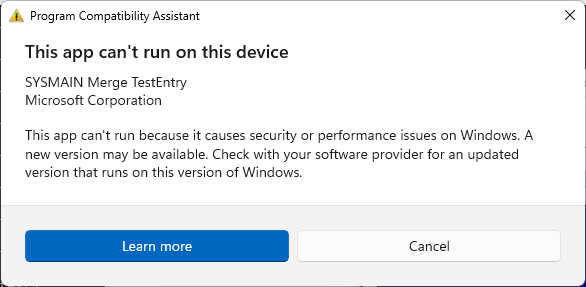
- SdbMergeTestEntry_Added_Exe_Item.exe
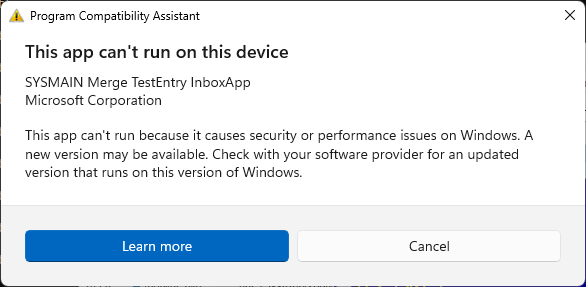
- SdbMergeTestEntry_Added_Exe_Item_InboxApp.exe
In other words, when you run a program that is named like the two aforementioned entries, you will get these messages:
Additionally, Windows 11 binaries handling shims include references to a list of folders that may be of some interest:
- %windir%\apppatch\AcPluginDlls\Plugin
- %windir%\apppatch\AcPluginDlls\PluginWow
- %windir%\apppatch\AcPluginDlls\PluginWowAMD64
- %windir%\apppatch\AcPluginDlls\PluginWowARM
- %windir%\apppatch\AcPluginDlls\PluginWowARM64
- %windir%\apppatch\AcPluginDlls\PluginWowX86
The Windows 11 installations I saw so far include these test Ac plugins:
- c:\WINDOWS\apppatch\AcPluginDlls\Plugin\AcPlugin_Test.dll
- c:\WINDOWS\apppatch\AcPluginDlls\Plugin\AcPlugin_Test2.dll
- c:\WINDOWS\apppatch\AcPluginDlls\PluginWowX86\AcPlugin_Test.dll
- c:\WINDOWS\apppatch\AcPluginDlls\PluginWowX86\AcPlugin_Test2.dll
The code referencing these directories resides in a few system libraries:
- apphelp.dll
- pcasvc.dll
- appraiser.dll
but I have not explored yet how they work. As of now, I assume this is a lesser-known Shim Database enhancement mechanism that could be potentially leveraged for persistence and stealth code injection…