You are browsing the archive for 2012 March.

Good Alternate Data Streams (ADS)

March 26, 2012 in Forensic Analysis

While ADS is not widely supported/used by many apps (maybe with a notable exception of malware :) ), it can be still used for some interesting purposes. In this short article, I describe a few legitimate uses of ADS by Windows programs that I know of.

If you know some others or if you spot any mistake, please let me know. Thanks.

This post is loosely based on this Microsoft list, but it contains some more details and looks at these streams from a ‘forensic angle’.

:$DATA

Standard ADS representing a content of the file.

:$WIMMOUNTDATA

This one is referenced by wimgapi.dll, wimserv.exe and recimg.exe (win8), but I don’t have more information about it.

:TASKICON_%d

This one is referenced by ieframe.dll (win8).

:Zone.Identifier

This is a name of a stream generated by Microsoft applications when user saves files to the local file system from a different security zone (e.g. Internet -> Disk).

The content of the file is just an information about the original Zone the file comes from:

Good news: presence of the stream confirms (in a ‘most likely’  CYA fashion) the file has been downloaded from the internet.

Bad news: Interestingly enough, some malware samples attempt to delete the :Zone.Identifier ADS attached to their executables immediately after they are executed – I guess it’s  because they want to:

  • remove the ‘flag’ from the file that highlights it as ‘downloaded from internet’ – yet another subtle anti-forensics in action
  • ensure that next time the file is launched (either via autostart entry or manually), it doesn’t pop up the ‘Are you surely sure you want to run this highly insecure program downloaded from the internetz’ message box

The code responsible for creating the :Zone.Identifier ADS is present in multiple system DLLs because the functionality is provided via IZoneIdentifier interface. The actual code adding stream is present in shell32.dll. (note: this and other code references is my best guess based on a quick grepping exercise on strings exported from all OS DLLs within system32 directory)

:favicon

This is a less known ADS that is being used by Internet Explorer. It acts as a cache and stores the favicon of the web site that has been bookmarked by the user.

It can be stored in files Page.url:favicon:$DATA; newer versions of IE appear to be also using format Page.website:favicon:$DATA

The content is just an .ico file – it can be extracted from a live system using ‘more’ command:

Previewing the extracted icon in Irfanview (and resizing it since it’s 16×16 pixels) shows the following picture (in my example BMI bookmark):

as shown in the properties window:

The good news: from a forensic perspective it could be an interesting information to provide in a final report if the user activities are discussed. Presence of this ADS indicates that the site the favicon refers to has been added most likely manually by the user (of course, ‘most likely’ in a CYA fashion since we can’t exclude 100% the possibility of malware adding it).

The bad news: if you want to experiment with this feature, I must warn you that various versions of IE are buggy when it comes to preserving the favicons. So, they may not be present on all versions of IE. I have not done an extensive study as I don’t have various versions of IE at hand, but quick & dirty experiments show that bookmarks I added under IE8 preserve :favicon stream, the IE9 doesn’t. Again, this is best to be tested for the particular version of IE.

Again, good news is that if you find it on the analyzed system, you may get some clues from it. And if you don’t find it, well – one less artifacts to look at ;)

If you want to play around, use procmon and use filter Path Containsfavicon

Code responsible for :favicon ADS can be found in ieframe.dll

:OECustomProperty

This is a stream created by Microsoft Outlook Express/Windows Mail. I don’t have an example at hand.

The code is stored in inetcomm.dll.

:Encryptable

Attached to Thumbs.db files and created when pictures are viewed in Thumbnail mode.

The same directory enumerated for ADS before thumbnail and after turning into Thumbnail mode

The code is stored in thumbcache.dll.

Document Properties Stream Name

This is a ‘garbage’ ADS one can see immediately after playing around with properties of a file stored inside a folder. The most known ADS is probably  ‘{4c8cc155-6c1e-11d1-8e41-00c04fb9386d}‘ (you can often see it in Procmon output).

Creating these is easy – one needs to e.g. change the title in the file properties box:

The same directory enumerated for ADS before the and after changing the title:

AFP_AfpInfo and AFP_Resource

Macintosh streams as explained on Microsoft web site. I don’t have more info about this one.

{59828bbb-3f72-4c1b-a420-b51ad66eb5d3}.XPRESS

XPRESS Stream is used during remote differential compression as explained on Microsoft web site. XPRESS is a compression algorithm and streams appear to be using when the compressed data is being downloaded. I don’t have more info about this one and at the moment I don’t know how to create a demo (show its creation on the system). Googling around, one can come across similarly named streams e.g.

  • {59828bbb-3f72-4c1b-a420-b51ad66eb5d3}.rdc.1
  • {59828bbb-3f72-4c1b-a420-b51ad66eb5d3}.rdc.2

Zoom. Enhance.

March 26, 2012 in Silly

This post won’t make you smarter. Move on. You have been warned ;)


This article on Wired talks about Mikko Hypponen’s war on malware. I haven’t read it :)

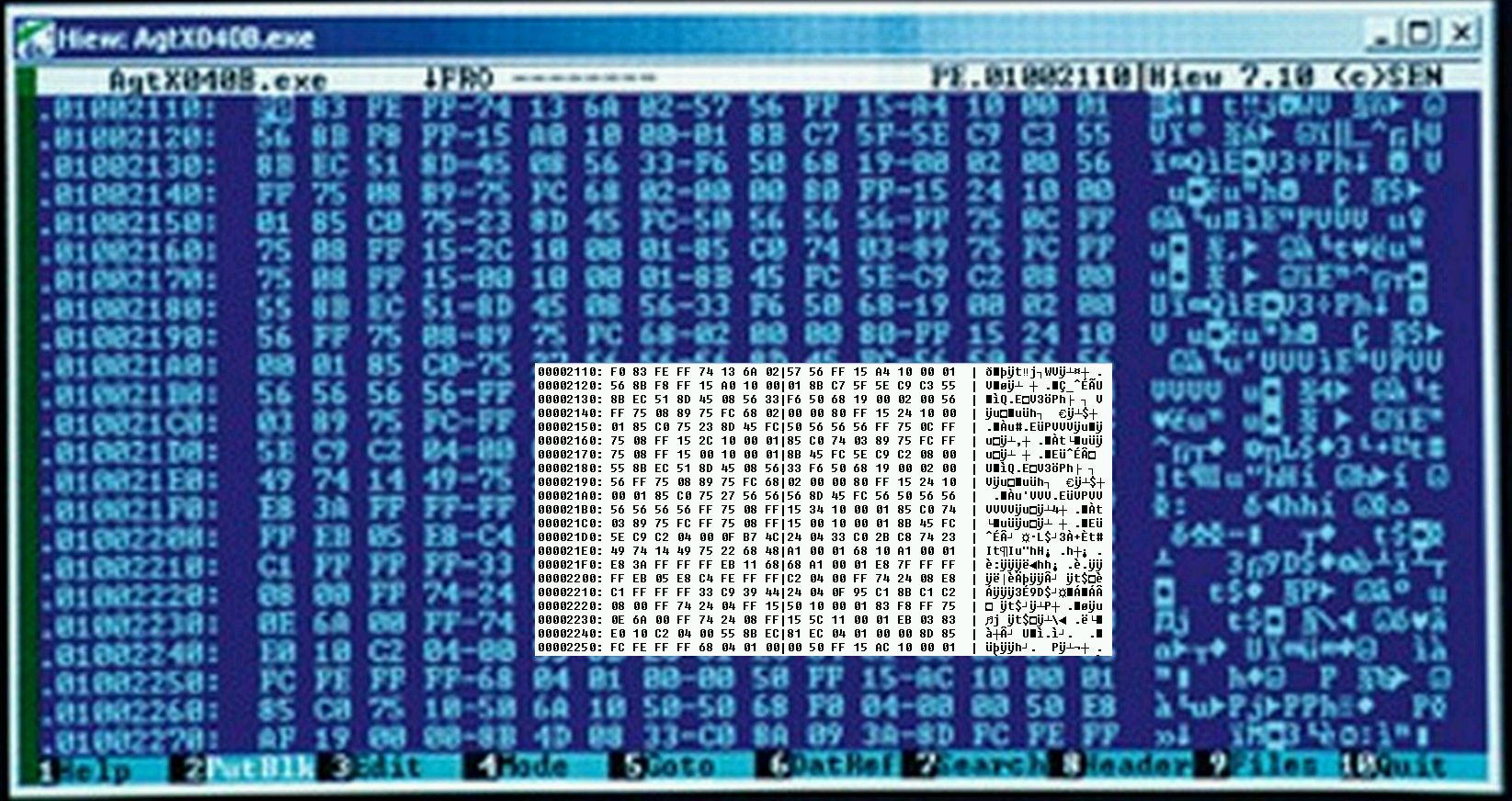
What caught my attention was a screenshot of Hiew showing some err… malware.

It triggered my interest so I investigated it by looking at it closer:

Zoom. Enhance. Hiew 7.10 has been used. Current version is 8.22. This is an old screenshot.

Zoom. Enhance. With the right equipment it can be enhanced

Hiew: AgtX0408.exe

Googling around for AgtX0408.exe brings us the following link:

http://activex.microsoft.com/activex/controls/agent2/AgtX0408.exe

Downloaded the file

The visual comparison brings us the following result:


Bingo.

Conclusion: image recycling at work & this is not a malware.

The shortest anti-forensics code in the world – take #2

March 16, 2012 in Anti-Forensics

In my older post, I claimed that replacing command line buffer is the shortest anti-forensics code as it takes 25 bytes only.

Sorry, I lied.

There are many ways to come up with a much shorter anti-forensics code. I will describe three ideas here. All of them are super obvious.

#1

Just use CopyFile function and copy Notepad.exe or any other file always present on the system over the file that is meant to be deleted (before its deletion). You may need some extra bytes for the file names, but well, it’s just one API call that it takes to implement a simple secure deletion.

#2

The second idea came (indirectly) from Harlan Carvey. He has been recently writing about his ongoing work to improve Prefetch file parsing script. While reading the MSDN article he referred to, I stumbled upon a description that I have read many times before, but never really thought of it from the anti-forensic angle.

In order to know what it should prefetch, the Windows XP Cache Manager monitors the page faults, both those that require that data be read from disk (hard faults) and those that simply require that data already in memory be added to a process’s working set (soft faults), that occur during the boot process and application startup. By default it traces through the first two minutes of the boot process, 60 seconds following the time when all Win32 services have finished initializing, or 30 seconds following the start of the user’s shell (typically Microsoft Internet Explorer), whichever of these three events occurs first. The Cache Manager also monitors the first 10 seconds of application startup.

Read the last sentence one more time:

The Cache Manager also monitors the first 10 seconds of application startup.

That is.

To reduce a number of forensically useful artifacts stored inside a Prefetch file, all the application has to do is… wait for 10 seconds. This can be easily achieved by running a function Sleep or NtDelayExecution at the entry point. Of course, there are extra bytes needed to import the function, etc., but since malware is often using one of these API anyway, a few bytes is what it takes.

I ran a quick test and it works as described:

The same code executed without any delay produced this Prefetch file:

General information :
  Filename  : PREFTEST.EXE
  Run count : 1
  Run time  : Fri Mar 16 17:29:33 2012 (UTC)

Prefetch file information:
  Reported size     : 2468
  Real size         : 2468
  Last access time  : Fri Mar 16 17:29:48 2012 (UTC)
  Modification time : Fri Mar 16 17:29:43 2012 (UTC)
  Creation time     : Fri Mar 16 17:29:48 2012 (UTC)

Filepaths block (1240) :
  \DEVICE\HARDDISKVOLUME1\WINDOWS\SYSTEM32\NTDLL.DLL
  \DEVICE\HARDDISKVOLUME1\WINDOWS\SYSTEM32\KERNEL32.DLL
  \DEVICE\HARDDISKVOLUME1\WINDOWS\SYSTEM32\UNICODE.NLS
  \DEVICE\HARDDISKVOLUME1\WINDOWS\SYSTEM32\LOCALE.NLS
  \DEVICE\HARDDISKVOLUME1\WINDOWS\SYSTEM32\SORTTBLS.NLS
  \DEVICE\HARDDISKVOLUME1\WINDOWS\PREFETCH\PREFTEST.EXE
  \DEVICE\HARDDISKVOLUME1\WINDOWS\PREFETCH\FILE.TXT

Volume information block (1976) :
  Volume Path   : \DEVICE\HARDDISKVOLUME1
  Serial Number : 1216058920
  Creation Time : Sun Jan  6 13:31:42 2008 (UTC)
  \DEVICE\HARDDISKVOLUME1\
  \DEVICE\HARDDISKVOLUME1\WINDOWS\
  \DEVICE\HARDDISKVOLUME1\WINDOWS\PREFETCH\
  \DEVICE\HARDDISKVOLUME1\WINDOWS\SYSTEM32\

and after adding at least 10 seconds delay at its entry point we get the following result:

General information :
  Filename  : PREFTEST.EXE
  Run count : 1
  Run time  : Fri Mar 16 17:30:30 2012 (UTC)

Prefetch file information:
  Reported size     : 2304
  Real size         : 2304
  Last access time  : Fri Mar 16 17:30:46 2012 (UTC)
  Modification time : Fri Mar 16 17:30:40 2012 (UTC)
  Creation time     : Fri Mar 16 17:30:46 2012 (UTC)

Filepaths block (1184) :
  \DEVICE\HARDDISKVOLUME1\WINDOWS\SYSTEM32\NTDLL.DLL
  \DEVICE\HARDDISKVOLUME1\WINDOWS\SYSTEM32\KERNEL32.DLL
  \DEVICE\HARDDISKVOLUME1\WINDOWS\SYSTEM32\UNICODE.NLS
  \DEVICE\HARDDISKVOLUME1\WINDOWS\SYSTEM32\LOCALE.NLS
  \DEVICE\HARDDISKVOLUME1\WINDOWS\SYSTEM32\SORTTBLS.NLS
  \DEVICE\HARDDISKVOLUME1\WINDOWS\PREFETCH\PREFTEST.EXE

Volume information block (1824) :
  Volume Path   : \DEVICE\HARDDISKVOLUME1
  Serial Number : 1216058920
  Creation Time : Sun Jan  6 13:31:42 2008 (UTC)
  \DEVICE\HARDDISKVOLUME1\
  \DEVICE\HARDDISKVOLUME1\WINDOWS\
  \DEVICE\HARDDISKVOLUME1\WINDOWS\PREFETCH\
  \DEVICE\HARDDISKVOLUME1\WINDOWS\SYSTEM32\

So, if you come across an empty Prefetch file in the future, don’t be surprised :-)

I used this script by Jean François Gingras to parse Prefetch files.

And this is a source of a masm32 code I used in a test:

.586
 .MODEL FLAT,STDCALL
 include    windows.inc
 include    kernel32.inc
 includelib kernel32.lib
 include    user32.inc
 includelib user32.lib

 .data
 file db 'file.txt',0

 .data?
 numOfBytesRead dd ?
 buffer db 256 dup(?)

 .code
 Start:
 ;  invoke Sleep,15*1000
 invoke CreateFileA, OFFSET file, \
 GENERIC_READ, \
 FILE_SHARE_READ or FILE_SHARE_WRITE, \
 NULL, \
 OPEN_EXISTING, \
 FILE_ATTRIBUTE_NORMAL, \
 NULL
 invoke ReadFile, eax, \
 OFFSET buffer, \
 SIZEOF buffer, \
 OFFSET numOfBytesRead, \
 NULL
 ; invoke Sleep,15*1000
 invoke ExitProcess,-1
 END Start

All you have to do is uncomment one of the lines ‘; invoke Sleep,15*1000‘ – first one, if you want to keep the Prefetch file clean, and second one if you want to see ‘file.txt’ inside the Prefetch file associated with the executable. Note, for the .pf file to be created program needs to run for at least 10 seconds and actually read the file.

This sort of tricks may sound like a good idea, but as many forensic investigators already know – and as pointed out by Harlan who commented on one of my previous posts here – that (quoting) “the absence of an artifact where you expect to find one is itself an artifact”. Indeed. Not having any file listed inside the Prefetch file doesn’t change the fact that its sole presence indicates the executable _has_ been ran and some useful forensic data can still be fetched from the *.pf files even if they are kind of empty.

This leads me to the third idea that is the most obvious.

#3

Malware can either delete the prefetch file, or use some way to hide it e.g. using PrefetchADS technique I described in one of my forensic riddles. This also can be achieved with one API call.


So, there you have it. Anti-forensics, counter-forensics, or forensics prevention can be implemented in a simple and very effective way. And even if they can’t fool an experienced investigator, they surely can take lots of fun from investigation, increase time spent on chasing after ghosts and remove all the juice from the final report. After all, it’s the ‘smoking gun’ that we all want to show, not a circumstantial evidence that leaves many questions unanswered.

MZ File format flavors & malware

March 10, 2012 in Malware Analysis

Analyzing files starting with the ‘MZ’ magic value can be called a “daily bread” for reverse engineers. The reason for this is pretty simple – if you look at the top of your average executable file you will notice that majority of them start with these 2 magic letters. Since it’s the most common file format that malware analysts work with, in this post I will have a deeper (but still high-level) look at files of this type.

There are so many types of executables starting with ‘MZ’ that looking at the first 2 bytes is often not enough. In fact, there are so many various flavors of MZ files, that it’s pretty hard to list them all, but let’s try anyway:

  • 16-bit, 32-bit and 64-bit executables
  • PC and mobile executables
  • x32, x64, IA64, AMD64, etc.
  • .NET
  • Executables for Windows 3.1 and Windows 9x/NT ( ‘NE’ vs. ‘PE’)
  • Drivers for Windows 3.1/Windows 9x and Windows NT ( ‘LE’ vs. ‘PE’)
  • GUI applications and console applications
  • User mode executables (processes, services – usually saved as files with the .exe, .scr, .cpl extension) and Dynamically Loaded Libraries (saved as files with .dll extension; others are saved as .ocx, .vbx, etc.)
  • User mode executables (processes) and services (service processes)
  • Kernel mode drivers (.sys, .drv) and kernel mode libraries (also saved with a .sys file extension)
  • Standard DLLs and COM DLLs (e.g. ActiveX, Browser Helper Objects)
  • Standard DLLs and Service DLLs (loaded by svchost.exe)
  • Dedicated DLL files (e.g. LSP, Shell extensions, deskbands, Plugins, MSGINA, windows hooks, etc.)
  • Old-school standalone executables (‘DOS type’)
  • Files produced by various compilers: Microsoft Visual Studio, Borland Delphi, Visual Basic, mingw32, gcc and many more.
  • Files produced by various script compilers e.g. perl2exe, py2exe, php2exe, AutoIt, WinBatch, etc.
  • Installers e.g. Nullsoft, InnoSetup, Wise, Vyse, etc.,
  • Resource-only files e.g. fonts
  • Executables with overlays
  • Executables with appended data

From malware analysis point of view, we have to also include another categorization as well, which is very much related to “extra” file properties often added by malware authors, including:

  • compression (packing)
  • encryption
  • wrapping
  • obfuscation
  • protection
  • corruption
  • virtualization
  • misleading information
  • anti-techniques

Finally, we can use as a classifier the presence and the content of the following metadata:

  • Rich header
  • Number of Sections
  • Characteristics of Sections (writable, readable, executable, etc.)
  • Characteristics of Import and export table
  • Debugging information (including timestamps and paths to .PDB files)
  • Resources information
  • Digital signatures
  • Appended data
  • Compiler specific information e.g. debug information, or PACKAGEINFO for Delphi application

It is super high-level, but as you may guess, analyzing any single executable listed on this list requires completely different approach.


Update #1:

fixed a mistake related to NE/PE – NE files have been replaced by PE files on 32-bit Windows; thx to Imaginative (one of the best reversers I know) for picking it up :-)

Update #2:

Just to clarify: NE files still run on Win XP + this file format is being used to store .fon files (Thx Ange @ corkami.com – he is one of the best binary magicians out there!)

HAPI – API extractor

March 3, 2012 in HAPI, Malware Analysis, Software Releases

Note

This software has been discontinued. Please use HexDive (it has all HAPI features plus lots more).

Also, check our other tools.

Old post

In one of my previous posts (Extracting Strings from PE sections), I demonstrated (ya… right, what a big word)  how easy it is to extract sections of PE file into separate files using 7-Zip so that they can be later used for targeted strings analysis. As I mentioned, splitting a file into sections can be really useful as it helps to reduce a number of random string-alike non-strings we see in the output of  ‘strings’ type of tools. Just to be on a secure side though – you may want to refer to my original post to find out more about caveats of such approach as there are cases when it may not be such a good idea.

There are many other techniques that can help in noise reduction and I am going to demonstrate one more today.

Analyzing Portable Executable (PE) files usually kicks off with running multiple static analysis tools including ‘strings’ and other tools that can help in determining what APIs are being used by a sample. One can use tools like PEDump, LordPE, PETools, Stud_PE, Dependency Walker, and lots of others that process sample’s import/export tables and help guessing what specific functionality is embedded in the sample.

Now, before we proceed further – three warnings here.

  • You should never, ever conclude your malware analysis with the output of ‘strings’, or PE parsing tools. This is a first step to shooting yourself in the foot. Always do code analysis. I will come back to this topic in the future in a separate post.
  • Ensure you actually know how these PE tools work. I know I don’t need to say this, but I have seen once a person using the Dependency Walker tool and analyzing malicious file by looking at the full list of functions exported from one of the Operating System DLLs. The DLL has not even been linked directly to a malware and was referenced only by a DLL that was directly linked to malicious .exe. In other words, the sample.exe was linked to kernel32.dll, kernel32.dll links to ntdll.dll. The guy was looking at the pane listing all functions exported by ntdll.dll. And while he was right that ntdll.dll does contain a lot of APIs used typically by malware, he was completely off the track! Oh, boy…
  • Obviously, APIs can often be found outside the import table since many packers, protectors, wrappers move them from import tables to internal data structures – they are often visible only when the memory of the protected process is dumped to a file; thus, none of typical PE parsing tools can ‘see’ them


So, now back to the original topic.

One simple noise reduction technique that is well known and used by many analysts is based on lists of patterns; these can be keywords, ANSI or Unicode strings, regular expressions, and practically speaking – any string of bytes that is unique and can be helpful in identifying interesting stuff inside the samples. This technique is used to some extent by projects like Yara, PEiD, and of course, it is extensively used by antivirus and IDS software. Having a good pattern list that identifies certain class of artifacts inside a file is a very attractive idea and I must confess that I am using such lists myself for a number of years.

After thinking one day on how to improve typical ‘strings’ analysis process I cooked a little program that focuses on one class of such patterns – APIs.

First, I built a list of over 50,000 thousands clean APIs, including:

  • Windows API
  • native APIs
  • kernel mode APIs

All of these are exported and imported by native Windows programs, drivers and DLLs. I combined them together into a large list. I then created a program that uses this list and searches for all of these inside the analyzed binary (note again: I run it most of the time on memory dumps, since many malicious samples come protected).

Yup. It’s that simple.

Now, you may be asking yourself – searching for 10-15 strings using a naive searching method (i.e. walk 10-15 times though the whole data searching for each string, or even using one regular expression) works well, but it is quite probable that for 50,000 and more strings we need to do better.

You are right.

This is a non-trivial problem, and naive algorithm doesn’t work here. Luckily, there are smart people out there who already figured it out.  I looked around and researched various multi-pattern search algorithms – eventually deciding to use a very well-known multi-pattern algorithm – Aho-Corasick. It uses a very clever method of finding patterns by walking a trie anytime new character is fetched from the input, so it can search for a large set of patterns simultaneously (well, it’s more complicated than that, but let’s say it is very fast even for 50k patterns).

Since building the search trie that Aho-Corasick algorithm relies on takes quite some time, I precompiled it and included it directly into an executable. So, here it is – a simple tool that extracts known API names from a given binary.

I hope you will find it useful.

Usage:

hapi <filename>

Download

Example

Used on a random malicious sample, it produces the following results:

————————————————————–
HAPI v0.1 (c) Hexacorn 2012. All rights reserved.
Visit us at http://www.hexacorn.com
————————————————————–
DnsQuery_A
DnsRecordListFree
EnumDeviceDrivers
GetDeviceDriverBaseNameA
UuidToStringW
SRRemoveRestorePoint
SRSetRestorePointA
ConvertStringSidToSidA
GetAdaptersInfo
IsUserAdmin
InternetOpenUrlA
HttpOpenRequestA
InternetCloseHandle
InternetConnectA
InternetOpenA
InternetSetOptionA
InternetQueryOptionA
HttpQueryInfoA
HttpSendRequestA
InternetReadFile
HttpAddRequestHeadersA
memmove
memcmp
_itoa
malloc
free
memset
wcstombs
strtok
mbstowcs
strlen
_itow
srand
rand
memcpy
wcsrchr
tolower
towlower
atoi
strcpy
__dllonexit
_onexit
_XcptFilter
_initterm
_amsg_exit
exit
_adjust_fdiv
lstrlenA
lstrcpyA
lstrcatA
CreateFileA
DeviceIoControl
CloseHandle
GetVersionExA
CreateFileW
WriteFile
FlushFileBuffers
GetFileSize
VirtualAlloc
ReadFile
VirtualFree
CreateThread
GetModuleFileNameW
lstrcpyW
lstrlenW
OpenMutexW
WaitForSingleObject
WaitForMultipleObjects
GetExitCodeThread
SetFilePointer
SetEndOfFile
CreateMutexW
ReleaseMutex
GetModuleFileNameA
DisableThreadLibraryCalls
ExitProcess
LoadLibraryW
Sleep
GetLastError
InitializeCriticalSection
DeleteCriticalSection
EnterCriticalSection
lstrcatW
LeaveCriticalSection
GetCurrentThreadId
TerminateThread
GetSystemTimeAsFileTime
GetProcAddress
GetModuleHandleA
OpenProcess
RaiseException
VirtualAllocEx
WriteProcessMemory
CreateRemoteThread
VirtualFreeEx
CreateToolhelp32Snapshot
Process32First
lstrcmpiA
Process32Next
GetCurrentProcess
FreeLibrary
LoadLibraryA
lstrcmpiW
GetWindowsDirectoryA
GetVolumeInformationA
GetSystemTime
SystemTimeToFileTime
GetTickCount
GetLogicalDriveStringsW
GetDriveTypeW
DeleteFileW
CreateDirectoryW
LocalFree
CreateProcessW
OpenMutexA
OpenEventA
GetCurrentThread
SetFileTime
CreateEventW
TerminateProcess
DeleteFileA
WideCharToMultiByte
HeapAlloc
GetProcessHeap
HeapFree
SetFileAttributesW
InterlockedIncrement
InterlockedDecrement
GetVersion
InterlockedExchange
InterlockedCompareExchange
RtlUnwind
QueryPerformanceCounter
GetCurrentProcessId
UnhandledExceptionFilter
SetUnhandledExceptionFilter
CallNextHookEx
SetWindowsHookExA
PostMessageA
wsprintfA
CharUpperW
GetSystemMetrics
RegQueryValueExW
RegSetValueExW
RegFlushKey
RegCloseKey
RegOpenKeyExW
OpenProcessToken
LookupPrivilegeValueA
AdjustTokenPrivileges
GetTokenInformation
RegCreateKeyExW
SetEntriesInAclA
SetSecurityInfo
DuplicateTokenEx
OpenSCManagerA
OpenServiceA
ControlService
ChangeServiceConfigA
AllocateAndInitializeSid
CheckTokenMembership
FreeSid
InitializeSecurityDescriptor
SetSecurityDescriptorDacl
SetTokenInformation
GetLengthSid
SetThreadToken
IsValidSid
ConvertSidToStringSidW
RegDeleteValueW
RegQueryValueW
RegQueryInfoKeyW
RegEnumKeyExW
RegEnumValueW
RegDeleteKeyW
CloseServiceHandle
QueryServiceConfigA
QueryServiceStatusEx
StartServiceA
SHGetFolderPathW
SHGetFolderPathA
CoCreateInstance
CoInitialize
CoUninitialize
CoCreateGuid
CoTaskMemFree
_except_handler3
_local_unwind2
_CxxThrowException
DllCanUnloadNow
DllGetClassObject

Okay, it’s not random. It’s the same one I used to demonstrate Anti-forensics – live examples :-)

Проверено. у нас мин нет!

March 3, 2012 in Hexacorn

Two days ago Yandex.ru listed hexacorn.com as malicious.

It was the only URL checker that highlighted it as malicious, but being on such list is always a serious concern:


I checked the web site, compared with the older backups and I didn’t see anything wrong. I then dropped Yandex.ru guys an email, and looks like they fixed their listing  – testing with VirusTotal shows it is all good now:

Not sure what caused this, but well… it’s all about heuristics and they are sometimes wrong.

Good to see Yandex.ru guys reacted so quickly.

Thanks!

And just in case you are wondering what the title means, this should provide you a context:


And no, I am not suggesting there were any mines on Hexacorn. Like everything, context has its scope and err… context :)

Image sources:

http://www.gazeta.lv/photos/5/Mina_4.jpg

http://www.gazeta.lv/photos/5/Mina_3.jpg

http://www.gazeta.lv/photos/5/Mina_8.jpg

Wasted Human cycle a.k.a. How dns-ok.us, dns-ok.de, etc. work

March 1, 2012 in Tips & Tricks

I came across these web sites while reading news about dnschanger and shutting down the DNS servers that used to be controlled by it. I was curious how it works, so decided to figure it out. Previously (for Conficker for example) this sort of pages just included IFRAMEs pointing to web addresses that were known to be blocked by modified hosts files, e.g. pages of AV companies. If any of these were blocked, you would know there is something going on with your system.

In this case it’s different. the page is static and just shows either in

GREEN

or

RED


I guessed it may be a change in DNS resolution that is different depending on your DNS settings – if the request goes through the ‘bad guy’, the server will return the ip for the red page, if your settings are good, it will return the green page.

Indeed, this is the case and you can confirm it via nslookup.

nslookup dns-ok.us
Name: dns-ok.us
Address: 38.68.193.96

nslookup dns-ok.us 77.67.83.1  <– 77.67.83.1 is a ‘bad guy’ DNS
Name: dns-ok.us
Address: 38.68.193.97

Check


Not a rocket science.

When I found out, I googled for IPs and lo and behold, I immediately spotted a comment from a guy using nick ‘TEA-Time’ talking about it few weeks back on Brian Krebs’ blog: https://krebsonsecurity.com/2012/02/half-of-fortune-500s-us-govt-still-infected-with-dnschanger-trojan/

Argh.

Here goes yet another wasted human cycle.

So this post is for you not to waste yours :-)