You are browsing the archive for 2011 November.

Forensic Riddle #2 – Answer

November 28, 2011 in Forensic Riddles - Answers

This is the answer to Riddle #2.

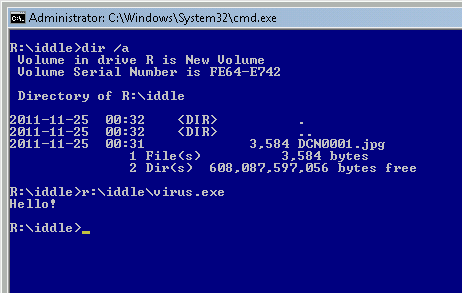
This one was an easy one as long as you are familiar with short file names; running a command “dir /x” would reveal a short name “virus.exe” associated with an executable file hidden behind a long name suggesting a JPG picture.

Thanks for trying & next riddle on Friday!
Forensic Riddle #2

November 25, 2011 in Forensic Riddles

It’s Friday again, so time for a new riddle.

The Riddle:

  • Where is the malware hiding?

Enjoy!

Answer here

Automation vs. In-depth Malware Analysis

November 21, 2011 in Malware Analysis, Preaching

Nowadays many web sites offer services that can be called ‘malware analysis for the crowd’. Web sites like VirusTotal, ThreatExpert, JSUnpack and many others provide a file scan/analysis functionality utilizing multiple antivirus scanners and/or sandbox/live analysis bundled with a bunch of other tools e.g. file format analyzers, packer detectors, and so on and so forth. They actually do a really great job and submitting samples to these services is one of the very first steps taken by many Incident Response handlers and Forensic Investigators all over the world. This post is my attempt to summarize my thoughts on the topic of both automated malware analysis in general and consensual submission of files to a web site owned by a third party.

You see… while it is a great source of immediate intel, submitting samples to the publicly available services is not always the best choice. There are real-life situations where it is not only a bad idea, but it also may be very costly to your company, or your customer. Both on the PR and financial side of things. So, while I do not oppose these services , I do believe that some serious thought needs to be given to it first, and of course, _before_ the submission. It is also my strong belief that you can’t rely on information you cannot yourself verify (if asked to). And if you do, you not only deprive yourself from a pleasure of finding things out, but also risk drawing incorrect conclusions.

The list below is obviously far from being complete:

  • The sample may be a part of the targeted attack
    • Samples submitted to these services are shared; they are shared for a good purpose of course, to produce AV signatures and provide better detection, but… sooner or later one of these sensitive sampless may fall into hands of a person that will eagerly write a cool blog about it (and frankly speaking, that will be a great blog entry!)
    • Malware including passwords, credentials for data extortion, as well as data that would clearly identify the customer is getting more and more common; trust me, there are many malicious samples out there that contain very sensitive data inside its code and you really don’t want them to be shared; researchers working for security companies know about it – they actively search and look for interesting samples because any new technique, new Rustock, Stuxnet, etc will not only boost the company’s profile and researcher’s own personal image - more importantly – it also allows them to escape a daily routine of writing signatures to focus on a cool stuff (you know who you are ;) )
  • AV scan is helpful to identify the malware, yet…
    • With a number of malware samples collected by AV companies being extremely high, it’s easy for a particular file to be detected incorrectly
    • Many AV companies use generic names like ‘trojan horse’, ‘trojan generic’, ‘heuristic badness’ etc.; this doesn’t really answer the question ‘what does this malware do’
    • AV companies may use other AV vendor’s scanners to automatically process large sample sets; a mistakenly classified malware can easily transfer the incorrect classification to other vendors (a fun fact: in 2010, one of the leading AV vendors pulled a leg of other vendors by generating 20 dummy malware samples for which they created detections and submitted these samples to VirusTotal; within less than 2 weeks, more than 10 vendors detected these files as malicious!)
    • Even scans with products from multiple AV vendors don’t guarantee detection – most AV engines do not detect new samples fast enough; you will be often left on your own with a new or targeted malware (take a note of this point: AV is still more a service that is reactive than proactive – someone needs to submit the sample first for the signature to be created)
    • False Positives are still there
  • Sandbox/live analysis is by its nature limited
    • It is not interactive, or interaction is very limited; it is easy to use, but this is its trade-off; you only see a data dump and a subset of artifacts, but without understanding the code and the context in which these artifacts have been created (of course, it is often enough to answer: is it malicious?, but not ‘what does it really do’)
    • It doesn’t rely on your company’s baseline build; thus, tested malware will run in an environment completely different from your company’s and may behave differently; practically speaking, if you are an incident responder interested in domains you want to block, or a forensic investigator, you can’t rely on the result of this analysis only; you may miss some of the artifacts that malware could produce have it got a chance to be executed within a slightly different environment or at a different time
    • Many malicious samples come with an anti-sandboxing technology; it is very simple to use and quite hard to bypass
  • Dynamic analysis in general is also very limited by its nature
    • It misses a lot of code branches, including dead code (some malware authors still use older compilers and these can produce executables like this); in some cases dead code helps to find some crucial information about malware authors or their modus operandi
    • It misses a lot of code/data/generated at runtime, decrypted at runtime, etc.
    • It misses the metadata associated with the sample – coding style, copied&pasted routines, hidden messages, config data, etc.
    • It assumes malware immediately does its dirty work; this can be easily slowed down by a long delay or other tricks e.g. built-in ‘expiration date’ or system/hardware ID (that is, some malware is pre-compiled to work on specifis system only)
    • Many malware samples used in targeted attacks won’t work in an environment not having specific files/paths/registry keys and will immediately exit; Stuxnet and credit card dumpers are good examples
    • Certain functions of malware are executed only if a specific application is running (e.g. browser, IM software)
    • It doesn’t work well for components e.g. DLL files (if they export functions, you don’t know what arguments to pass)
    • It doesn’t work well for kernel mode drivers, as well as PDFs, SWF, Java, DEX, SIS, and hundreds of other file formats that you will come across in your career
    • It doesn’t work for server-side malware
    • It also doesn’t work well for malware that expects… command line arguments
    • and million other reasons…
  • Last, but not least – if you are using older browser, you are providing a web site with a full path to a sample location on your hard drive; this may look innocent, but you may be revealing information about your customer, current case or even your own company or credentials (%USERPROFILE%\Desktop\ACMECASE\sample.zip is a really bad idea to place your samples)

As you can see, there are many reasons why you should be careful when you handle samples extracted from yours or your customers’ systems. There are companies out there that have been exposed because the samples targetting their systems have leaked to the public.

It also makes sense to invest time and learn on how to do in-depth malware analysis in-house, or at least find a trusted specialist to help you with this task. You can stand by any claim coming out from your analysis, and more importantly – you will als have a lot of fun while cracking the malware.

The bottom line is:

  • Use automation as much as you can
  • Think twice before you submit the samples to web sites owned by third party and more importantly – assume and accept the fact that you lose control over the distribution of your samples
  • Use data from multi AV scan/sandbox/live analysis as a foundation for further analysis, not as a final conclusion
  • Do not trust threat names provided by automated tools, and understand that the difference between threats is getting more and more blurry; even if some malware is called virus or trojan, it may also include worm’s capability, rootkit functionality and MBR infection routines
  • If you add results of automatic analysis to your reports, do your homework and confirm findings manually, or state that it is impossible (and provide the reasons)
  • Do learn and use in-depth malware nalysis techniques but also understand that it has limitations as well – some malware takes months to develop and is improved over the time, often reaching level of complexity making its analysis really hard; sometimes it is just not worth it
  • Read other blogs – just because one guy says something, doesn’t mean it is correct – learn to question everything and trust only stuff that is peer reviewed

Forensic Riddle #1 – Answer

November 21, 2011 in Forensic Riddles - Answers

The answer to Forensic Riddle #1 is pasted below. It’s BASE64 encoded, just in case you still didn’t have a chance to look at the riddle itself and maybe plan to give it a go w/o spoilers.

The OS is 64-bit. One window is created by a native 64-bit version of cmd.exe and another one by its 32-bit version – the directory listing shown on a screenshot is different in both windows due to Wow64 redirection mechanism redirecting 32
-bit application to ‘see’ %systemroot%\SysWOW64\drivers as %systemroot%\System32\drivers.

Thanks for trying & next riddle on Friday!

Forensic Riddle #1

November 18, 2011 in Forensic Riddles

I have always been interested in riddles and puzzles, and I have a lot of respect for people who create them. So, when I’ve been thinking of opening this blog I always had in mind a section that would be dedicated to riddles. The idea is of course not new. I borrowed this particular one from Richard Wiseman – one of my favorite authors. He posts a puzzle every Friday and provides an answer to it on Monday.

So, stepping on giant’s shoulders I will be posting a new riddle every Friday as well. The topic will be forensics, malware analysis, and any sort of binary-data related fun facts. The goal is to post something short, simple, and relatively easy to crack, yet a bit quirky or with a twist, so that you may have fun and hopefully learn something new. Of course, if you are in the industry long enough, you will crack it in no time.

I will start with something I have came up with 2 years ago while working for my previous employer. I modified it to avoid potential copyright issues, yet the fundamental principle stays the same. In a hindsight, it is not that difficult, yet I think the guys who faced it found it challenging at that time and their interesting approach to the problem (they generated a lot of ideas!) led me to post a few more riddles on our internal mail list.

The Riddle:

  • command executed on the same system
  • command is “dir wimmount.sys”
  • 2 different windows, 2 different results
  • why?


Answer here

How to use HAM?

November 13, 2011 in HAM

This is a short intro tutorial on how to use HAM. The basic idea is to show how to:

  • Load an application for analysis
  • Pass command line arguments to the analyzed program
  • Choose APIs
  • Run
  • Observe the output

So, let’s begin:

  • First, download and run HAM. You should see the following screen:
  • Now, Press F3, Ctrl-O, or choose File->Open Executable from the application menu.
  • Go to your System Directory:
  • Type ‘notepad.exe‘ and hit Enter
  • Type the command line argument for Notepad e.g. ’test.txt‘ – this file will be opened by Notepad:
  • Press Alt+A or click the icon as shown below: 
  • Choose ‘CreateFileW‘ API in the API Functions window:
  • Press F5 or click the icon as shown below:
  • The Notepad will now be launched, modules loaded by Notepad will be shown in a small window; for each module loaded, HAM will attempt to intercept all APIs as selected earlier in the API Functions – in our case it is only ‘CreateFileW’ :
  • Each module loaded by Notepad is shown in the output pane; Notepad window is shown on the Desktop as well; as you can see, CreateFileW API has been called once, and with the argument being a file name that we typed in Notepad Open File window i.e. ‘test.txt‘; 

We can conclude this demo with the following observations:

  • Notepad is indeed using CreateFileW when it opens the files
  • The file is being open with the flag OPEN_EXISTING i.e. it will attempt to open existing file, without overwriting it
  • The file is open in both FILE_SHARE_READ and FILE_SHARE_WRITE mode i.e. you could open file in Notepad and then still overwrite it with an external application e.g. echo foo>test.txt while it is being edited.

We also learnt that:

  • Loading applications for analysis and passing arguments to it is very straightforward
  • In order to use it efficiently, it is good to have some basic understanding of Windows programming, You need to know which APIs to select to monitor the analyzed program efficiently.
  • HAM works on Windows 8 Developer Preview :-)

As you can see, by just looking at arguments passed to APIs, as well as the flow of the APIs being called, multiple things can be done:

  • it may help in in-house malware analysis
  • it may help with vulnerability research
  • it may help in understanding Windows API and Windows internals
  • it may allow to discover undocumented or unexpected quirks of windows (e.g. what mutexes are created by a given application, what strings are hard coded and compared against by certain APIs, etc.)
Enjoy!

Hexacorn Application Monitor

November 13, 2011 in HAM, Software Releases

Between years 2004-2007 I maintained a small hobby programming page where I was releasing free software tools and various snippets in assembly. One of the programs I have written at that time was Kakeeware Application Monitor – a very small API monitor coded entirely in x86 assembly language. The last update has been made in 2007 and I have not touched the program since.

In July 2011 I decided to come back to my old sources and fix a few bugs and add new APIs that have been introduced in Vista and Windows 7, plus other APIs I could find. After poking around I managed to build a decent list of new APIs and these that I have missed previously. Turns out that after putting it all together, the number of APIs that the program can now handle expanded to almost 12000!

After few months of polishing, I am finally ready to release a new version. Since all my code will be now released under Hexacorn name, I changed the program’s name as well, so from now on it will be called Hexacorn Application Monitor (a.k.a. HAM). And just for the fun of it, I also added ‘Pro’ to its name :) .

Hexacorn Application Monitor

Hexacorn Application Monitor

This program is FREE for both commercial and non-commercial use. Yup, you heard that right. Note that this is a new version of the tool that has been not updated in 4 years. It surely contains bugs and some of the APIs may not be intercepted properly. If you find bugs. or find it useful, please do let me know. Thanks.

Enjoy!

I will soon post some practical examples on how to use it and what sort of stuff you can find with it.

Download HAM

The Pleasure of Finding Things Out

November 4, 2011 in Hexacorn

Hexacorn blog is about the pleasure of finding things out.

The title may sound familiar to you and you are right. ‘The Pleasure of Finding Things Out’ is a collection of short works from American physicist Richard Feynman.

Feynman was an extraordinary person, or at least he managed to made many people think this way. It doesn’t matter. What matters is that he was right about finding things out. It is a very satisfying activity that offers a lot intellectual pleasure. Just think about it for a second… If you ever solved a puzzle, or created one… if you managed to bypass some security protection like crack a game, or pick the lock, you know what I am talking about. There is that litttle craze, a drive that makes you work on the problem long hours, until you solve it.

At Hexacorn, we are fascinated by it. We just love to crack stuff. And we will be writing about it.